
Automatic Laminator Hub » Laminator Purchase Guide [by Facility Type] » Commercial Laminators
for Print Shops and Business Use
for Print Shops and Business Use
Commercial Laminators
for Print Shops and Business Use
Index
This guide explains how to choose a commercial laminator for print shops, copy centres, design offices, and other businesses that handle printed materials in-house.
The right machine depends not only on how many sheets you laminate, but also on media size, finishing requirements, operator workload, processing speed, and the level of automation you need. By comparing these factors before installation, you can reduce waste and labour, improve turnaround times, and achieve a consistent professional finish.
Types of Commercial Laminators
Commercial laminators come in several formats, and the best choice depends on the type of work you handle. Some categories overlap—for example, an automatic sheet-fed machine may also use thermal roll film—but understanding the main differences makes it easier to narrow down the right equipment for your workflow.
| Type | Typical Use Cases | Main advantages | Points to consider |
|---|---|---|---|
| Pouch laminators | Offices, schools, and light business use | Simple operation and easy job changes | Manual feeding and a higher consumable cost per sheet can make them less suitable for larger production runs |
| Roll laminators | Print shops, copy centres, and regular production work | Continuous processing and efficient film use | Film loading and machine set-up require more operator knowledge |
| Automatic sheet-fed laminators | Print shops with frequent or high-volume jobs | Reduces manual feeding and can automate multiple finishing processes | Higher initial investment and more installation space may be required |
| Cold laminators | Heat-sensitive prints, graphics, and speciality applications | Allows lamination without exposing the printed material to high heat | Requires compatible pressure-sensitive film |
| Wide-format laminators | Posters, signs, displays, and large-format graphics | Can process media wider than standard office and print-shop formats | Requires more floor space and may involve a different production workflow |
Hot vs Cold Lamination
Thermal, or hot, lamination uses heat to activate the adhesive in the film and is widely used for printed documents and commercial finishing. Cold lamination uses pressure-sensitive film and is useful when the substrate, ink, or printed surface may be affected by heat. When choosing between the two, check both the print process and the film specifications recommended for the job.
Commercial vs Industrial Laminators
The terms “commercial” and “industrial” laminator are sometimes used interchangeably, but they can refer to very different machines. Commercial laminators are commonly used for printed materials in print shops, copy centres, offices, and print-finishing environments. Industrial laminating equipment may be designed for manufacturing and converting applications involving specialised substrates or continuous production lines. Before comparing models, confirm that the machine is designed for the type, size, and volume of material you actually need to process.
Which Commercial Laminator Is Right for Your Business?
The amount of laminating you handle each day is a useful starting point, but it should not be the only factor in your decision. Job size, peak demand, finishing steps, operator availability, and the amount of manual handling required can all affect the productivity of a laminator.
Light or occasional production: Compact commercial laminators
For design offices, small businesses, or workplaces that laminate relatively small batches, a compact commercial laminator can provide a good balance of durability, ease of use, installation space, and upfront cost. This type of machine is also useful as a secondary laminator for specific jobs or occasional peak demand.
Regular daily production: Roll or semi-automatic laminators
For businesses handling laminating work throughout the day, a roll laminator or semi-automatic model can reduce repetitive manual work and improve overall processing efficiency. Compared with light-duty equipment, these machines are generally better suited to repeated jobs where film efficiency, consistent output, and turnaround time become more important.
High-volume production: Automatic commercial laminators
For print shops and other production environments handling frequent jobs, automation can have a greater impact than maximum laminating speed alone. Machines with automatic feeding, sheet separation, or trimming can reduce the time operators spend handling individual sheets and moving work between separate finishing processes. Although the initial investment is higher, the benefit can increase as production volume and labour requirements grow.
How to Choose a Commercial Laminator for a Print Shop
A commercial laminator for a print shop needs to fit into the complete print-finishing workflow, not simply laminate at a high rated speed. Before choosing a machine, consider how jobs enter the laminator, what happens after lamination, and how much operator involvement is required from start to finish.
1. Processing Speed and Real-World Throughput
Maximum laminating speed is useful for comparing specifications, but it does not tell you the full production time for a job. Sheet size, loading time, job changeovers, film replacement, trimming, and operator intervention can all affect actual throughput. For busy print shops, compare machines based on the complete workflow rather than speed in mm/min alone.
2. Manual Feed vs Automatic Sheet Feeding
A manually fed laminator may be suitable when jobs are small or change frequently. For repeated or larger batches, however, automatic sheet feeding can reduce the amount of time an operator must remain at the machine. This is especially important when labour savings are one of the main reasons for introducing new finishing equipment.
3. Sheet Separation and Trimming
Lamination is often only one stage of the finishing process. If laminated sheets must be manually separated and transferred to another machine for trimming, the total job can take considerably longer than the laminating cycle itself. Automatic separation or trimming can therefore be valuable for print shops looking to shorten turnaround times and reduce manual handling.
4. Single-Sided vs Double-Sided Lamination
Check whether your typical jobs require lamination on one side of the printed sheet or on both sides. The appropriate machine and film configuration can differ depending on the application. Print shops handling a wide variety of work should confirm the supported laminating methods before choosing equipment.
5. Media and Print Compatibility
Consider more than maximum sheet width. The machine should also suit the paper weights, media thicknesses, printed surfaces, and speciality stocks used in your normal production. If you handle digitally printed, coated, thick, or heat-sensitive materials, confirm compatibility with the laminator and film before production.
6. Operator Time and Labour Requirements
The fastest machine is not always the most productive machine for your business. A model that automates feeding, laminating, separation, or trimming may allow staff to spend less time on repetitive finishing tasks. When comparing commercial laminators, consider how many manual steps are required for each job and how long an operator needs to stay with the machine.
7. Film and Total Operating Cost
Purchase price is only one part of the cost of a commercial laminator. Film consumption, wasted prints, operator time, maintenance, and any separate finishing equipment should also be considered. For regular production, a machine with a higher purchase price may offer a lower overall cost if it reduces film waste or manual work.
Commercial Laminator Selection Checklist
Use the following checklist when comparing a commercial or business laminator. For print shops in particular, look beyond the basic machine specifications and consider how each model will affect the complete finishing process.
| Supported sizes and media | Can it handle both your standard and custom sheet sizes? Can it process the paper weights, thick stock, and speciality media used in your normal jobs? |
|---|---|
| Processing speed and durability | Is the speed sufficient during peak production periods? Is the machine designed for the frequency and duration of use you expect? |
| Feeding system | Are sheets fed manually or automatically? How much operator attention is required during a production run? |
| Lamination method | Does the machine support the type of lamination required for your applications? Check requirements such as thermal or cold processing and single- or double-sided jobs. |
| Automation and finishing | Can feeding, sheet separation, or trimming be automated? Will you need separate equipment or additional manual processes after lamination? |
| Film cost | Is the film cost reasonable for your typical production volume? Can the machine use the film thicknesses and finishes required for your work? |
| Ease of operation | Can multiple employees operate the machine consistently? Are there functions that help prevent incorrect settings or processing errors? |
| Operator requirements | How many manual steps are involved in each job? Does an operator need to remain at the laminator throughout processing? |
| Installation space and power requirements | Will the machine fit into the existing production flow without obstructing other work? Is it compatible with your facility's voltage and amperage? |
| Maintenance and support | Is routine maintenance, including roller cleaning, straightforward? Are spare parts, servicing, and technical support available if a fault occurs? |
CHECK
Find the Right Commercial Laminator for Your Workflow
The right commercial laminator depends on your print volume, media size, finishing requirements, available space, and the amount of manual work you want to reduce.
Explore our laminator range to compare machines for print shops, copy centres, design offices, and other business environments, from compact models to fully automatic production systems.
Commercial Laminator Comparison
The three models below are designed for different types of professional work. Compare not only maximum speed and width, but also the level of automation and the type of workplace each model is best suited to.
| Model | Best for | Maximum width | Maximum processing speed | Key productivity feature | Warm-up |
|---|---|---|---|---|---|
| LAMI Revo-Flex | Print shops handling mixed jobs and reducing manual finishing work | 320 mm (A3 compatible) | 2,000 mm/min | Automatic feeding, laminating, and four-side trimming | About 5 minutes |
| Peak High Speed PHS-330 | Production environments where high processing speed is a priority | 330 mm (A3 compatible) | 2,000 mm/min | High-speed processing with ClearView™ cover | About 5 minutes |
| Leitz iLAM Touch 2 Turbo | Shared offices and business environments where simple operation matters | 320 mm (A3 compatible) | 1,500 mm/min | Automatic thickness detection and speed adjustment | About 1 minute |
Commercial Laminator List
Below are three laminators suited to different professional applications, from automated print finishing to shared business use. The best model will depend on your production volume, workflow, available space, and the amount of operator involvement you want to reduce.
LAMI Revo-Flex
Best for print shops handling mixed jobs and reducing manual finishing work
| Maximum width | 320 mm (A3 compatible) |
|---|---|
| Maximum processing speed | 700 to 2,000 mm/min (variable) |
| Supported film thickness | 38 μm / 80 μm / 100 μm / 125 μm / 150 μm |
| Warm-up | About 5 minutes |
| Power supply (CE) | AC230 V / 1,000 W |
The LAMI Revo-Flex is a fully automatic laminator that automates feeding, laminating, and trimming. Its four-side trimming function allows the operator to choose whether to leave a border or trim flush. Because feeding and finishing can be completed within the same workflow, the machine is particularly useful for print shops handling frequent short runs, mixed job types, and tight deadlines. Reducing the need to move laminated sheets to a separate trimming process can also help lower operator workload.
Peak High Speed PHS-330
Best for production environments where laminating speed is a priority
| Maximum width | 330 mm (A3 compatible) |
|---|---|
| Maximum processing speed | 2,000 mm/min (variable) |
| Supported film thickness | Up to 250 μm (500 μm total thickness) |
| Warm-up | About 5 minutes |
| Power supply | AC220 to 240 V / 1,150 W |
With a maximum processing speed of 2,000 mm per minute, the PHS-330 is designed for workplaces where fast laminating is a key requirement. The transparent ClearView™ cover makes it easy to monitor the laminating process and check the material as it passes through the machine. It is a strong option for busy workplaces processing repeated laminating jobs under tight turnaround times.
Leitz iLAM Touch 2 Turbo Laminator
Best for shared business environments where ease of use matters
| Maximum width | 320 mm (A3 compatible) |
|---|---|
| Maximum processing speed | 1,500 mm/min (variable) |
| Supported film thickness | 80 to 250 μm |
| Warm-up | About 1 minute |
| Power supply | AC220 to 240V / 1,700 W |
With a warm-up time of around one minute, the Leitz iLAM Touch 2 Turbo is suitable for workplaces where the laminator needs to be ready quickly. A built-in sensor detects the thickness of the material and automatically adjusts the processing speed. This makes it particularly useful as a business laminator shared by multiple employees, where simple operation and consistent settings are important.
Benefits of Using a Commercial Laminator
For print shops, design offices, copy centres, and businesses producing printed materials in-house, commercial laminating equipment can improve durability and give finished work a more professional appearance. This can increase the value of products such as menus, signs, presentation materials, cards, and other frequently handled printed items.
Commercial machines are also designed for more consistent and productive operation than light-duty equipment. Choosing a laminator that matches your workflow can reduce processing errors, wasted materials, and unnecessary operator time while helping you maintain reliable turnaround times.
Frequently Asked Questions
About Choosing a Commercial Laminator
How should a print shop determine the required laminator capacity?
Start with your typical job sizes and daily production volume, but also consider peak periods, job changeovers, finishing steps, and expected future demand. Maximum laminating speed alone does not represent actual production capacity. A commercial laminator for a print shop should have enough capacity to handle busy periods without creating a bottleneck in the overall finishing workflow.
When is an automatic commercial laminator worth the investment?
Automation becomes particularly valuable when operators spend significant time feeding sheets, separating laminated output, trimming, or moving work between different machines. When comparing an automatic laminator with a lower-cost manual model, consider the total operator time required per job as well as the purchase price. For businesses processing frequent or repetitive jobs, reducing manual finishing steps can improve overall productivity.
What should be compared besides laminating speed?
Important factors include sheet feeding, supported media sizes and thicknesses, film compatibility, warm-up time, job changeover requirements, sheet separation, trimming, and the amount of operator intervention required. Installation space, electrical requirements, maintenance, and service availability should also be checked. The best commercial laminator is the one that improves the complete production workflow rather than simply offering the highest rated speed.
How should film and operating costs be evaluated when comparing commercial laminators?
Compare more than the purchase price of the machine. Film consumption, compatible film types and thicknesses, wasted material during setup, operator labour, maintenance, and any additional equipment required for trimming or finishing can all affect operating costs. For regular production, evaluating the total cost per job can provide a more useful comparison than machine price alone.
How can a print shop confirm that a laminator is compatible with its printed materials?
Check the laminator specifications against the sheet sizes, paper weights, media thicknesses, printing methods, and film types used in your regular production. Particular attention may be needed for coated, thick, speciality, or heat-sensitive materials. Before introducing a new machine into production, confirm compatibility for the actual combinations of printed media and film you expect to use.
What service and maintenance factors matter when choosing a business laminator?
For a laminator used regularly in a business or print-production environment, downtime can affect delivery schedules as well as operating costs. Check how routine roller cleaning and maintenance are performed, whether replacement parts are readily available, and what technical support or repair services are provided. For higher-volume operations, after-sales support can be an important part of the purchasing decision.
[Advertisement]
[By production scale]
Three Fully Automatic Laminators
[By production scale]
Three Fully Automatic Laminators
When choosing a fully automatic laminator, it is important to base your decision on the volume you process in a day rather than the size of the main unit or equipment scale.
This is an introduction to fully automatic laminators that match the workload and operational style of different production scales.
Advertiser Disclosure:
We receive compensation from some of the companies listed below.This compensation may affect which companies are included and the order in which they appear.
[About 100+ sheets per month]
Small-lot production
Small-lot production
GBC Foton 30
(ACCO Brands Corporation)
(ACCO Brands Corporation)
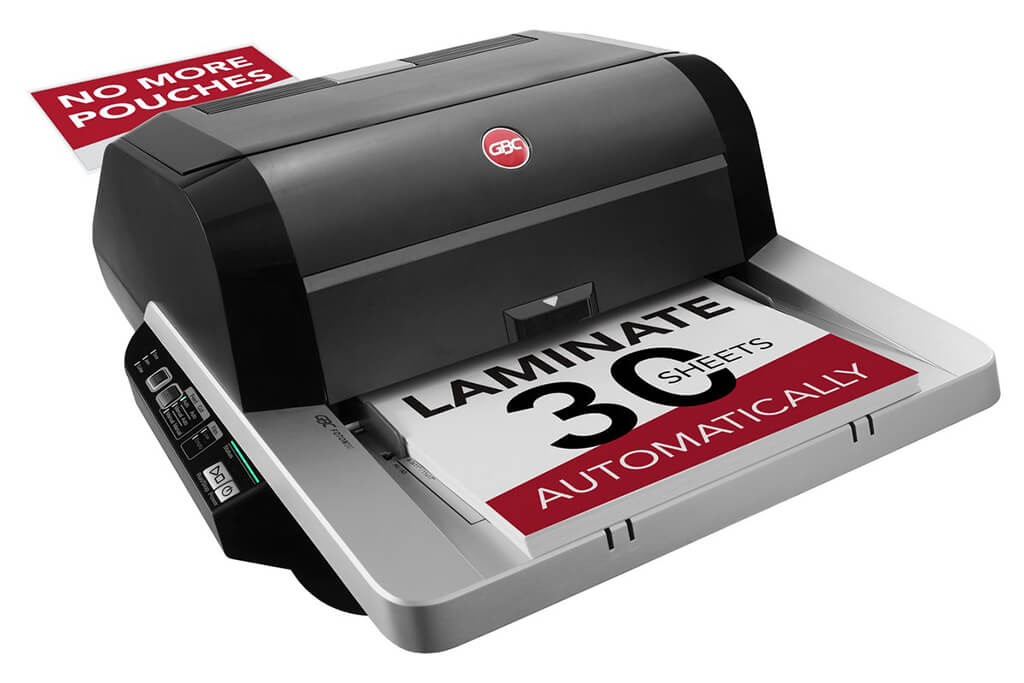
Image Source: ACCO Brands Corporation Official Site
(https://www.gbc-machines.com/products/gbc-foton-30-automatic-laminator)
(https://www.gbc-machines.com/products/gbc-foton-30-automatic-laminator)
Example facilities
Schools, hospitals, municipalities, etc.
Reasons for recommendation
Automates small-scale operations with fewer personnel
- With the push of a button, automatically laminates 30 sheets of A4 paper in 15 minutes. Its size allows it to be placed on a desk, making it easy to install.
- By fully automating the process from feeding to lamination, it enables the handling of jobs with low daily processing volumes in parallel with other operations.
The fact that it does not require dedicated operators or subsequent processes makes it suitable for small-scale sites.
| Maximum processing speed | 7.0 m/min |
|---|---|
| Maximum width | 297 mm (A3 compatible) |
| Warm-up | about 4 minutes |
| Processing type | roll type, double-sided (with borders) |
| Voltage (CE) | AC220 to 240V |
| Main unit dimensions | W 580 mm / D 440 mm / H 250 mm |
[About 1,000+ sheets per month]
Medium-lot production
Medium-lot production
Revo-Flex
(Lami Corporation)
(Lami Corporation)
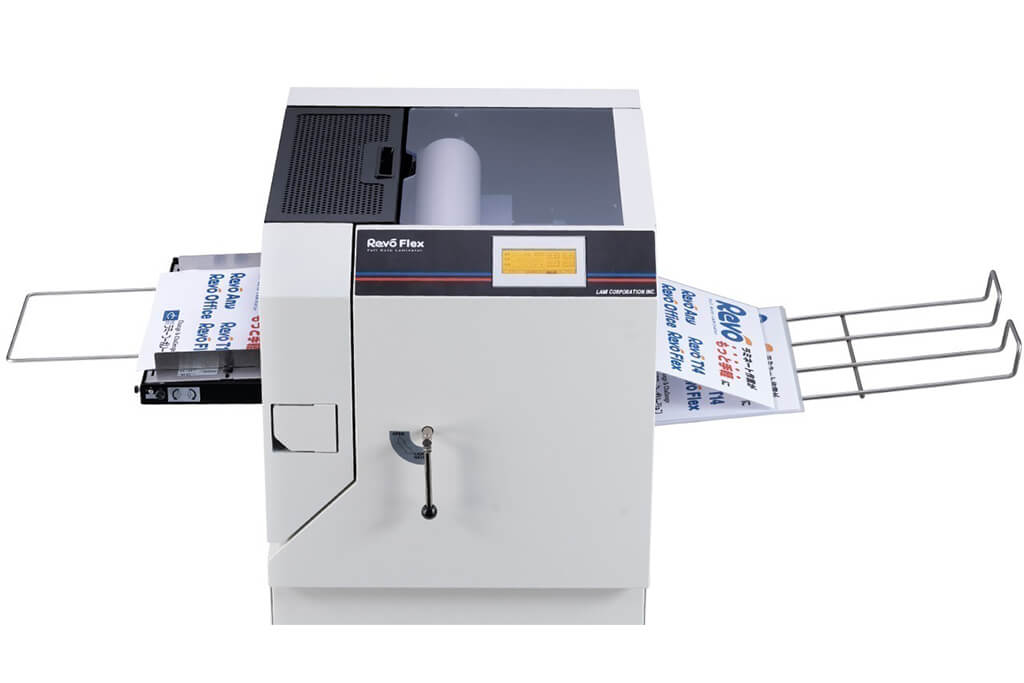
Image source: LAMI Corporation Official Website
(https://www.lami-corporation.co.jp/english/products/detail/51)
(https://www.lami-corporation.co.jp/english/products/detail/51)
Example facilities
Output centers, design offices, franchise headquarters, etc.
Reasons for recommendation
High-mix, fast-turnaround jobs are efficient through process reduction
- Completes trimming simultaneously with lamination, eliminating the need to move to subsequent processes or separate equipment.
Eliminates bottlenecks that tend to occur in on-demand printing and production sites. - High-precision automatic four-side trimming reduces trimming errors resulting from manual work, reducing film loss and the hassle of reprinting.
Even at sites with high-mix, small-lot production, it processes efficiently with consistent quality.
| Maximum processing speed | 2.0 m/min |
|---|---|
| Maximum width | 320 mm (SRA3 standard) |
| Warm-up | about 5 minutes *1 |
| Processing type | roll type, double-sided (border on/off selectable) |
| Voltage (CE) | AC230V |
| Main unit dimensions | W 1,300 mm / D 610 mm / H 1,080 mm *2 |
[10,000+ sheets per month]
High-lot production
High-lot production
Mini 76 TH
(Autobond Laminating)
(Autobond Laminating)
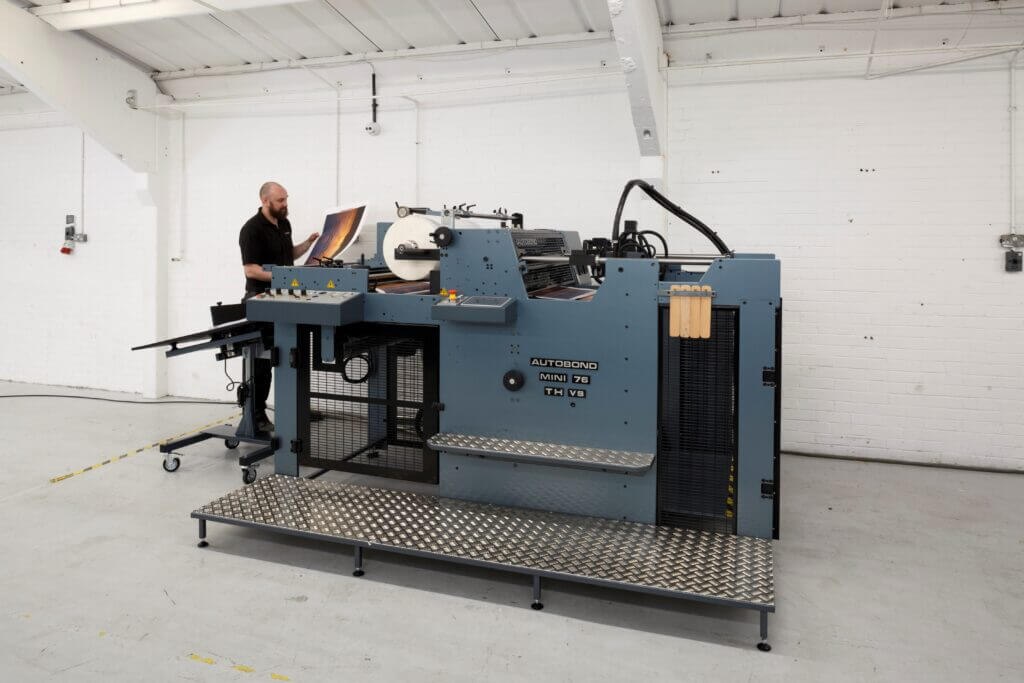
Image source: AUTOBOND Official Website
(https://www.autobondlaminating.com/machinery/thermal-lamination/mini/mini-76-th/)
(https://www.autobondlaminating.com/machinery/thermal-lamination/mini/mini-76-th/)
Example facilities
Printing factories, bookbinding lines, etc.
Reasons for recommendation
High-speed, continuous processing that can be integrated into mass-production lines
- Uses a steel side plate with a thickness of 20 mm described as sturdy like a tank. This rigid structure physically eliminates vibrations even at high-speed operations of 60 m per minute, maintaining stable processing accuracy.
- With a processing capacity of 60 m per minute, it can continuously handle large-format prints stably.
It demonstrates its true value when introduced as a part of a production line rather than as a standalone machine.
| Maximum processing speed | 60.0 m/min |
|---|---|
| Maximum width | 760 mm (B1+ compatible) |
| Warm-up | inquire for details |
| Processing type | roll type, single-sided or double-sided (borderless) |
| Voltage (CE) | inquire for details |
| Main unit dimensions | inquire for details |
*1. At 100°C (212°F) setting
*2. Dimensions when assembled, including the stand, tray, etc.