
A3 Laminator
Index
In this article, we explain A3 laminators from a business-use perspective, with a focus on improving day-to-day productivity and ensuring consistently reliable results.
Typical Applications and Where A3 Laminators Are Used
- Print shops and bookbinding / finishing companies
Shop posters, display panels, promotional materials, menus, and more - On-demand print shops
POPs, campaign notices, and in-store signage for short-run, high-mix print jobs - Schools and educational institutions
Protecting teaching materials and noticeboard displays designed for durability and repeated use - Government offices and local authorities
Protecting documents intended for long-term display, such as safety notices and application process flowcharts - In-house documentation teams within companies
Maintaining print quality and improving durability for internal materials such as manuals and training documents
Why A3 is often the preferred size
A3 is chosen because it strikes a natural balance between information volume, visual guidance, and overall presentation.
It gives you enough space to organise what you want to communicate and display it clearly. In many situations, A4 simply does not provide enough room, while A2 and larger formats can be cumbersome to handle. A3 sits neatly in the middle, making it a practical choice.
Another advantage is that it is not excessively large, so many desktop models and compact professional laminators can handle A3 without difficulty.
A3 vs SRA3: Size Comparison
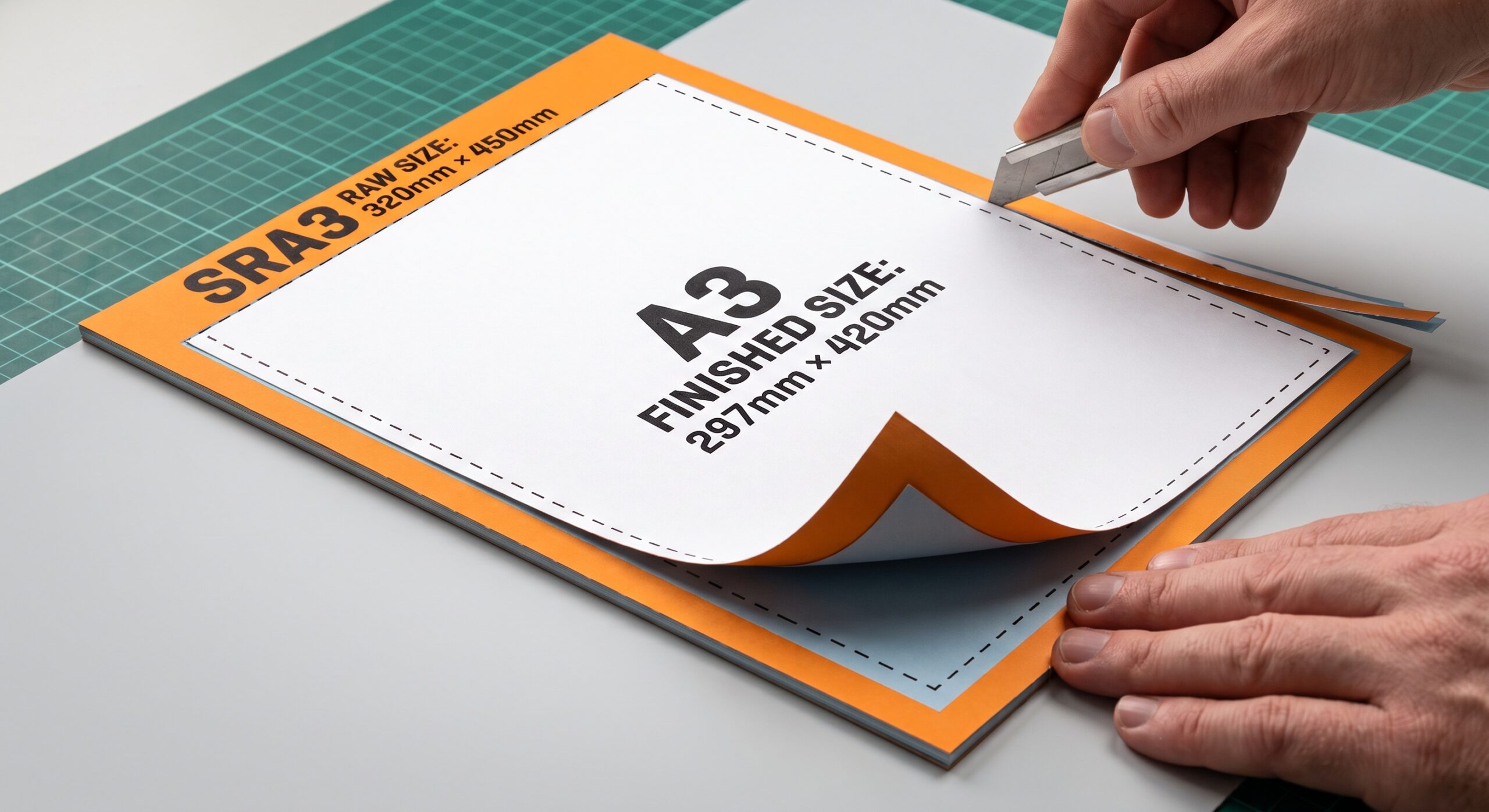
SRA3 is a paper size designed for an A3 finished output. It includes extra margins for trimming.
In print shops and on-demand printing, it is common to print on SRA3 rather than A3. This helps address print misalignment, enables automatic trimming after lamination, and ensures consistent finishing quality. The typical workflow is to laminate the printed sheets and then trim them down to the final size. When choosing a professional A3 laminator, SRA3 compatibility is an important point to confirm.
| Item | A3 | SRA3 |
|---|---|---|
| Size | 297×420 mm | 320×450 mm |
| Primary use | Finished size | Pre-processing size |
| Margins | None | Trimming margins included |
Can an A3 Laminator Also Laminate A4 and A5 Documents?
Yes, an A3 laminator can generally process smaller paper sizes, including A4 and A5. Because A3 is larger than A4 and A5, the feed slot is wide enough to accommodate these smaller formats without issue.
However, there are a few important details to keep in mind:
- Minimum Size Limits: While smaller documents fit, each laminator model has a minimum supported paper size and specific feeding requirements. Very small items may require a carrier sheet to prevent jams.
- Matching Pouch Size: Always use a laminating pouch that matches the document size (e.g., an A4 pouch for an A4 document). Oversized pouches can be used in some cases, but excessive trimming after lamination may compromise the sealed edge. Always follow the manufacturer's recommendations.
- SRA3 Considerations: SRA3 paper is slightly larger and wider than standard A3. Standard A3 laminators usually cannot accommodate SRA3 documents unless explicitly rated for A3+ or SRA3.
| Paper Size | Can an A3 Laminator Handle It? | What to Check |
|---|---|---|
| A3 | Yes | Maximum standard size; ensure the document is aligned properly before feeding. |
| A4 | Yes | Use matching A4 pouches and feed straight into the center of the slot. |
| A5 | Yes | Confirm the machine's minimum supported size; use a carrier sheet if recommended by the manufacturer. |
| SRA3 | No (Usually) | SRA3 exceeds standard A3 dimensions; requires an A3+ or SRA3-compatible model. |
A3 Laminator Comparison: Pouch vs Roll vs Fully Automatic Models
Why These Three Types Must Be Evaluated for A3 Formats
The A3 format represents an important decision point in laminating efficiency, workflow design, and operating cost. Compared with smaller A4 documents, A3 sheets require more precise handling due to their larger surface area, which can increase the risk of alignment issues, film waste, and inconsistent finishing during lamination.
For the same A3 laminating applications, the choice of film delivery mechanism—individual pouch feeding (Pouch), continuous roll feeding (Roll), or automated feed-and-cut systems (Fully Automatic)—creates significant differences in processing speed, labor requirements, material efficiency, and output consistency.
Understanding these differences is essential when selecting equipment that matches the required workload, operating environment, and long-term cost structure.
Key Comparison Chart
| Criteria | Pouch Laminator | Roll Laminator | Fully Automatic Laminator |
|---|---|---|---|
| Suitable Use | • Occasional, low-volume A3 laminating • Documents requiring sealed edge protection • Custom or irregular items where flexibility is important |
• Regular batch laminating jobs • Posters, menus, signs, and extended-length materials • Applications requiring efficient continuous processing |
• High-frequency, repetitive A3 document workflows • Offices, schools, and print environments requiring reduced operator involvement |
| Operator Work | High (Fully Manual Operation) • Each sheet must be inserted and aligned manually inside a pouch • Operator involvement is required for every cycle |
Moderate (Manual Feeding) • Sheets are manually fed through the rollers • No individual pouch preparation required • Trimming may be required after lamination depending on the application |
Low (Automated Workflow) • Automated feeding, laminating, and cutting functions may be available depending on the model • Allows operators to focus on other tasks during production |
| Typical Production Volume | Low-volume applications • Best suited for occasional use and small batches |
Medium to high-volume applications • Efficient for continuous production runs and repeated jobs |
High-frequency applications • Designed for workflows where reducing repetitive manual labor is a priority |
| Main Advantage | • Lowest initial equipment investment • Sealed edges provide enhanced moisture protection • Simple operation with minimal training requirements |
• Supports A3+ and extended-length materials • Lower material waste during continuous production • Wide compatibility with different film thicknesses and applications |
• Minimizes operator involvement per task • Automated processes improve output consistency • Reduces quality variations caused by manual handling |
| Cost Structure | • Initial machine cost: Lowest • Film cost per sheet: Higher due to pre-cut pouch format |
• Initial machine cost: Moderate • Film cost per unit area: Lowest in continuous production environments |
• Initial machine cost: Highest • Operating cost can be reduced through labor savings and efficient workflows |
| Finish & Trimming | • No additional trimming required for standard pouch applications • Creates a consistent sealed border around the document |
• Manual trimming may be required depending on the desired finish • Additional cutting tools may be needed for precise sizing |
• Automated cutting or finishing functions may be available depending on the machine configuration • Provides consistent output dimensions |
| Maintenance & Skill Requirement | • Very low maintenance • Suitable for first-time users |
• Basic operating knowledge required • Regular cleaning and roller care recommended |
• Requires initial setup knowledge • More advanced systems may require additional maintenance procedures |
Decision Framework
Choose a Pouch Laminator if:
- Your laminating needs are occasional and batch sizes are generally small.
- You prioritize the lowest initial investment.
- You need simple operation without specialized training.
- Edge-sealed protection is important for frequently handled documents.
Choose a Roll Laminator if:
- You regularly process multiple documents in batches.
- You need flexibility for A3+, posters, menus, signs, or extended-length materials.
- Reducing film waste and material cost is a major priority.
- An operator is available to manage sheet feeding and finishing tasks.
Choose a Fully Automatic Laminator if:
- You frequently process large numbers of A3 documents.
- Reducing repetitive manual labor is important.
- Consistent output quality is required across different operators.
- Your workflow benefits from automated feeding, laminating, and finishing functions.
Conclusion
There is no single best laminator for every A3 application. The ideal choice depends on the relationship between workload, labor availability, material cost, and required output quality.
- Pouch laminators are optimized for simplicity, flexibility, and occasional use.
- Roll laminators provide the best balance of productivity and material efficiency for regular production.
- Fully automatic laminators are designed for organizations seeking maximum workflow efficiency and reduced operator dependency.
Selecting the right laminating system based on actual usage patterns will help achieve better productivity, lower operating costs, and more consistent results.
Pre-purchase Checks
- Maximum sheet size (A3 only vs SRA3-compatible)
- Supported paper thickness
- Laminating speed and continuous throughput
- Warm-up time
- Ease of operation (automatic settings and presets)
- Installation requirements (desktop vs floor-standing)
For A3 workflows, whether SRA3 compatibility is necessary and the laminating speed under continuous operation directly affect productivity. Rather than relying on a simple spec comparison, it is important to select a model that will not become a bottleneck when measured against on-site realities such as peak-time volume, available installation space, and the operator’s level of experience.
How to think about increased processing frequency
When choosing a laminator, the perspective of processing frequency is essential, alongside sheet size.
As volume increases, time lost to manual feeding and repeated setup accumulates. For business use, this is exactly why automation features become increasingly important.
On this site, we have carefully selected fully automatic laminator models by production scale across different facilities. Use this as a reference when considering your introduction.
How to Choose Film for a Roll-Type A3 Laminator
- Film thickness (lightweight 25 to 50 μm / medium 75 to 100 μm / heavyweight 125 to 250 μm)
- Surface finish (gloss or matt)
- Roll width (around 330 mm for A3 / around 340 to 350 mm for SRA3)
- Roll length (short 50 to 100 m / medium 200 to 300 m / long 500 m+)
- Core diameter (about 25.4 mm / 50.8 mm / 76 mm)
Choose the film thickness and finish to suit the application. Roll width and core diameter, however, depend on the machine specifications, so checking compatibility is essential. Pay particular attention to SRA3 support and any limits on roll outer diameter.
With automated models, even heavyweight film and long rolls are less prone to set-up errors, helping to keep output stable and consistent. Alongside the specifications, make sure to review the automation features as well.
FAQs About A3 Laminators
Q. What determines how easy it is to replace the film?
A. It largely depends on the loading mechanism, such as whether the machine uses a cartridge system or manual loading.
Cartridge systems streamline replacement and make results less dependent on the operator. Manual loading offers greater flexibility, but it requires more familiarity and careful handling.
Q. How can I reduce running costs?
A. For small volumes, pouch laminating is usually sufficient. In workplaces handling high print volumes or continuous runs, roll laminating often lowers the cost per sheet, making it easier to reduce overall expenses.
Q. What kind of workplace is a fully automatic laminator best suited to?
A. It is ideal for environments where labour saving and higher productivity are priorities.
Compared with manual-feed machines, a fully automatic laminator requires less operator involvement and can automate settings and sheet transport. The higher the throughput, the greater the benefit. It is well suited to workplaces that want to maintain consistent quality while shortening processing time.
[Advertisement]
[By production scale]
Three Fully Automatic Laminators
[By production scale]
Three Fully Automatic Laminators
When choosing a fully automatic laminator, it is important to base your decision on the volume you process in a day rather than the size of the main unit or equipment scale.
This is an introduction to fully automatic laminators that match the workload and operational style of different production scales.
Advertiser Disclosure:
We receive compensation from some of the companies listed below.This compensation may affect which companies are included and the order in which they appear.
[About 100+ sheets per month]
Small-lot production
Small-lot production
GBC Foton 30
(ACCO Brands Corporation)
(ACCO Brands Corporation)
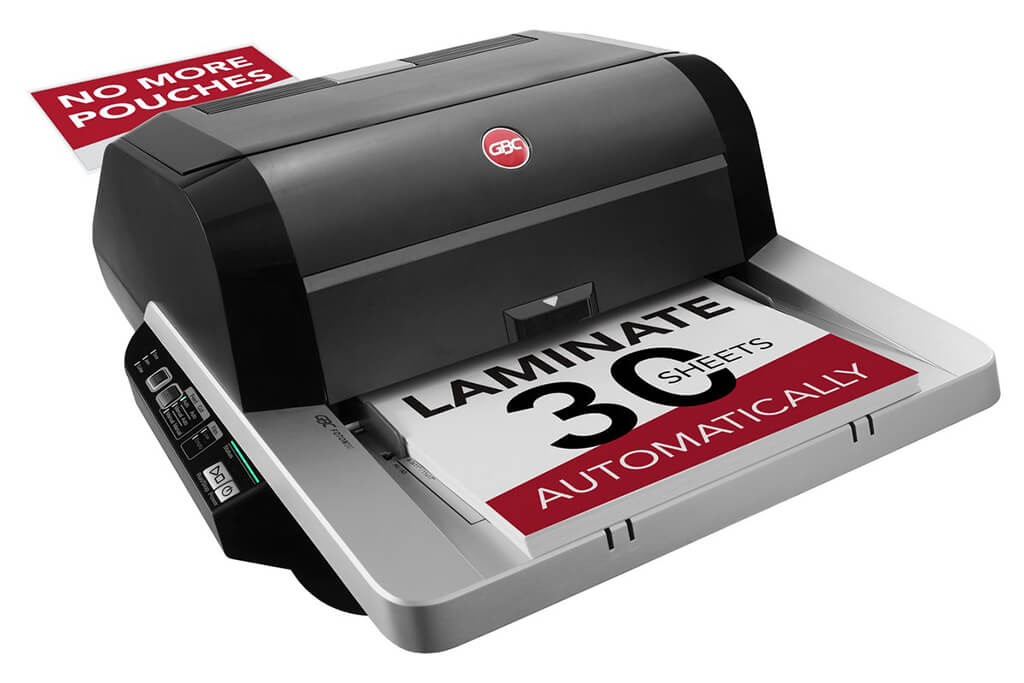
Image Source: ACCO Brands Corporation Official Site
(https://www.gbc-machines.com/products/gbc-foton-30-automatic-laminator)
(https://www.gbc-machines.com/products/gbc-foton-30-automatic-laminator)
Example facilities
Schools, hospitals, municipalities, etc.
Reasons for recommendation
Automates small-scale operations with fewer personnel
- With the push of a button, automatically laminates 30 sheets of A4 paper in 15 minutes. Its size allows it to be placed on a desk, making it easy to install.
- By fully automating the process from feeding to lamination, it enables the handling of jobs with low daily processing volumes in parallel with other operations.
The fact that it does not require dedicated operators or subsequent processes makes it suitable for small-scale sites.
| Maximum processing speed | 7.0 m/min |
|---|---|
| Maximum width | 297 mm (A3 compatible) |
| Warm-up | about 4 minutes |
| Processing type | roll type, double-sided (with borders) |
| Voltage (CE) | AC220 to 240V |
| Main unit dimensions | W 580 mm / D 440 mm / H 250 mm |
[About 1,000+ sheets per month]
Medium-lot production
Medium-lot production
Revo-Flex
(Lami Corporation)
(Lami Corporation)
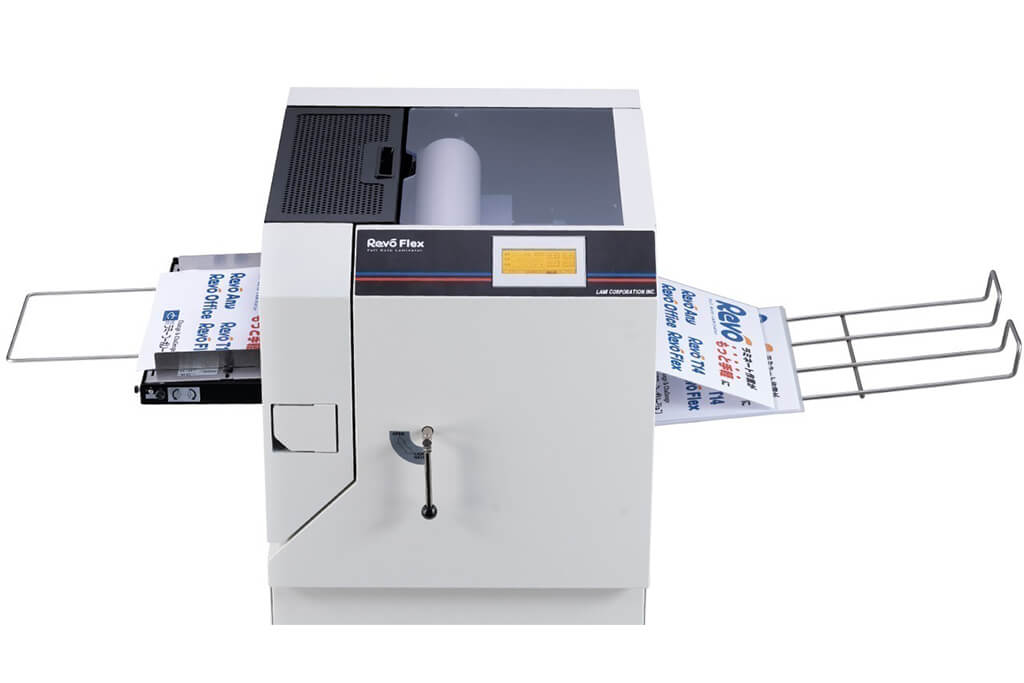
Image source: LAMI Corporation Official Website
(https://www.lami-corporation.co.jp/english/products/detail/51)
(https://www.lami-corporation.co.jp/english/products/detail/51)
Example facilities
Output centers, design offices, franchise headquarters, etc.
Reasons for recommendation
High-mix, fast-turnaround jobs are efficient through process reduction
- Completes trimming simultaneously with lamination, eliminating the need to move to subsequent processes or separate equipment.
Eliminates bottlenecks that tend to occur in on-demand printing and production sites. - High-precision automatic four-side trimming reduces trimming errors resulting from manual work, reducing film loss and the hassle of reprinting.
Even at sites with high-mix, small-lot production, it processes efficiently with consistent quality.
| Maximum processing speed | 2.0 m/min |
|---|---|
| Maximum width | 320 mm (SRA3 standard) |
| Warm-up | about 5 minutes *1 |
| Processing type | roll type, double-sided (border on/off selectable) |
| Voltage (CE) | AC230V |
| Main unit dimensions | W 1,300 mm / D 610 mm / H 1,080 mm *2 |
[10,000+ sheets per month]
High-lot production
High-lot production
Mini 76 TH
(Autobond Laminating)
(Autobond Laminating)
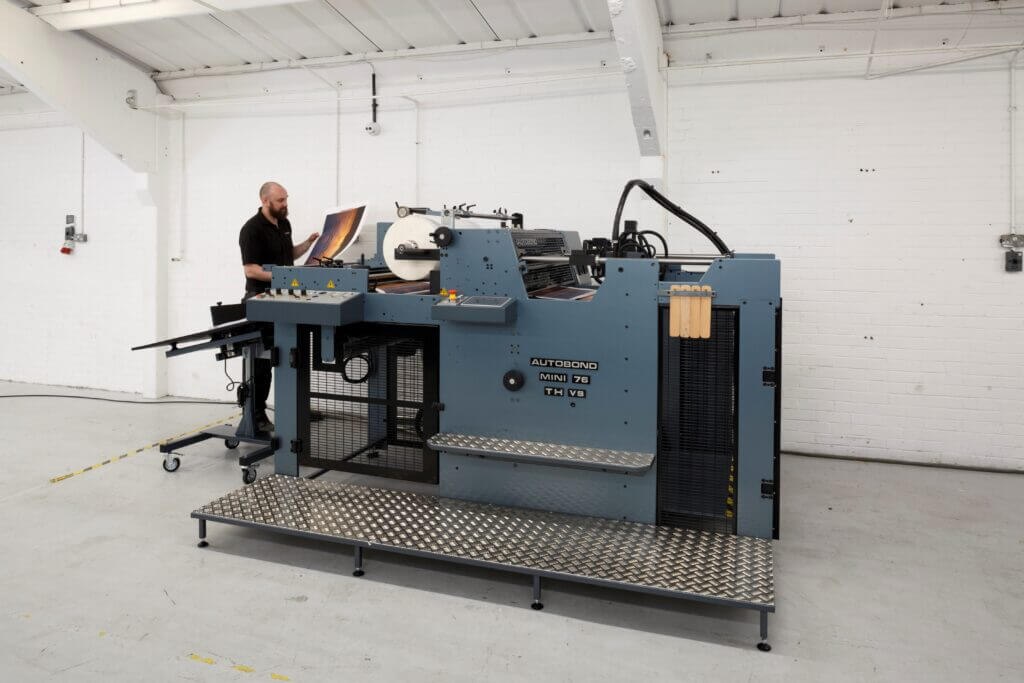
Image source: AUTOBOND Official Website
(https://www.autobondlaminating.com/machinery/thermal-lamination/mini/mini-76-th/)
(https://www.autobondlaminating.com/machinery/thermal-lamination/mini/mini-76-th/)
Example facilities
Printing factories, bookbinding lines, etc.
Reasons for recommendation
High-speed, continuous processing that can be integrated into mass-production lines
- Uses a steel side plate with a thickness of 20 mm described as sturdy like a tank. This rigid structure physically eliminates vibrations even at high-speed operations of 60 m per minute, maintaining stable processing accuracy.
- With a processing capacity of 60 m per minute, it can continuously handle large-format prints stably.
It demonstrates its true value when introduced as a part of a production line rather than as a standalone machine.
| Maximum processing speed | 60.0 m/min |
|---|---|
| Maximum width | 760 mm (B1+ compatible) |
| Warm-up | inquire for details |
| Processing type | roll type, single-sided or double-sided (borderless) |
| Voltage (CE) | inquire for details |
| Main unit dimensions | inquire for details |
*1. At 100°C (212°F) setting
*2. Dimensions when assembled, including the stand, tray, etc.