
Laminator Maintenance Guide
Regular laminator maintenance helps prevent wrinkles, bubbles, jams, weak adhesion, and unexpected downtime. Even a high-performance laminator can produce inconsistent results if the rollers, film path, temperature settings, and consumables are not managed properly.
This guide covers the essential maintenance points for laminators, including daily cleaning, roller care, jam prevention, troubleshooting, and what to check before choosing a laminator for business or high-volume use.
Note: Cleaning methods, cooling procedures, supported consumables, and service requirements vary by laminator model and supplier. Always follow the manufacturer’s instructions before cleaning, troubleshooting, or requesting repairs.
Key Takeaways
- Clean rollers and film paths regularly to prevent adhesive build-up, dust, and feeding problems.
- Many laminating problems are caused by incorrect film, unsuitable settings, misalignment, or insufficient cleaning.
- Never force jammed materials through the machine. Follow the manufacturer’s recovery procedure.
- For business use, check maintenance access, service support, and parts availability before purchase.
Why Laminator Maintenance Matters
A laminator relies on heat, pressure, rollers, and reliable film feeding to produce a clean, consistent finish. When adhesive residue, paper dust, film scraps, or dirt remain inside the machine, output quality can quickly become inconsistent.
Wrinkles, bubbles, jams, peeling, and uneven finishes do not always mean the machine is broken. In many cases, they are caused by dirty rollers, incompatible film, incorrect temperature settings, skewed feeding, or poor operating habits.
For occasional use, these issues may only waste a few sheets. For business or production use, however, they can lead to rework, material loss, operator downtime, and delivery delays. Regular maintenance is not just a cleaning task. It is part of keeping laminated output consistent and reducing unexpected interruptions.
Daily Maintenance Checklist
Daily maintenance starts before the first sheet enters the machine. Operators should check that the film, pouch, or roll is compatible with the laminator, that the material is correctly aligned, and that the selected settings match the job.
During operation, watch for early warning signs such as skewed feeding, repeated bubbles, wrinkles, unusual noise, a burning smell, or film that does not move smoothly. Stopping early can prevent a minor issue from turning into a jam or damaged output.
After use, remove visible dust around the feed area and allow the machine to cool down according to the manufacturer’s instructions. If adhesive residue or film scraps remain near the rollers or film path, clean them using the recommended method before the next use.
| Timing | Maintenance point |
|---|---|
| Before use | Check the film, sheet alignment, supported thickness, and machine settings. |
| During use | Watch for wrinkles, bubbles, skewed feeding, unusual noise, or repeated misfeeds. |
| After use | Remove dust, allow the machine to cool down, and check for adhesive residue or film scraps. |
| Regularly | Clean the rollers and inspect the film path according to the manufacturer’s instructions. |
How to Clean Laminator Rollers
Let the Machine Cool Down First
Turn off the laminator and let it cool down before cleaning, unless the manufacturer specifies a different procedure. Hot rollers can cause burns, and cleaning the machine incorrectly while it is hot may damage parts or spread adhesive residue.
If the machine has a cool-down mode, reverse function, release lever, or cleaning mode, follow the instructions in the manual. Do not open covers, touch internal parts, or attempt to remove stuck film unless the procedure is clearly approved for that model.
Remove Adhesive Residue and Dust
Adhesive residue on the rollers can transfer to the next job, pull film out of alignment, or cause material to stick inside the machine. Paper dust, small film scraps, and dirt can also affect feeding and finish quality.
Use the cleaning method recommended by the manufacturer. Some machines may require cleaning sheets, approved cloths, or model-specific procedures. For pouch laminators, a carrier may help reduce adhesive transfer to the rollers when the machine requires or recommends one.
Cleaning should be carried out before residue builds up. Once adhesive hardens or spreads across the roller surface, it may become harder to remove and may require service support.

Illustrative diagram.
Follow the manufacturer’s instructions for inspection and cleaning.
Follow the manufacturer’s instructions for inspection and cleaning.
Avoid Sharp Tools and Unsupported Chemicals
Do not scrape rollers with metal tools, knives, or other sharp objects. Scratches on the roller surface can cause feeding problems, leave marks on the output, or create uneven pressure.
Unsupported solvents or strong chemicals may damage rubber rollers, coatings, sensors, or internal parts. If adhesive residue cannot be removed using the recommended method, contact the supplier or service provider instead of forcing the cleaning process.
How to Prevent Jams and Misfeeds
Use Compatible Film and Sheet Thickness
Many jams start with incompatible materials. If the film, pouch, roll, or printed sheet is thicker than the machine supports, it may not pass through the rollers smoothly.
Check the supported film thickness, pouch thickness, roll width, core size, and material thickness before use. For roll laminators, incorrect roll specifications can also cause tension problems, skewed feeding, or film tracking issues.
Feed Materials Straight
Skewed feeding can cause wrinkles, uneven margins, film shift, and jams. Before feeding, make sure the sheet edge is not folded, curled, or damaged. Thin materials, large sheets, and flexible printed items may require extra care to keep them aligned.
For repeated work, create simple operating rules so every user feeds materials in the same way. When multiple operators use the same machine, inconsistent feeding is often a hidden cause of inconsistent output.
Do Not Pull or Force Jammed Materials
Forcing a jammed sheet through the laminator can damage rollers, gears, sensors, or internal parts. Pulling film or paper by force may also leave fragments inside the machine and make the next jam more likely.
If a jam occurs, stop operation and follow the manufacturer’s recovery procedure. If the machine has a reverse function, release lever, or open-access mechanism, use it only as instructed. For business-use machines, keep the recovery procedure visible near the laminator so operators do not improvise when a problem occurs.
Common Laminator Problems and Maintenance-Related Causes
Laminating problems often have more than one cause. Before assuming the machine needs repair, check whether the issue is related to cleaning, settings, consumables, or feeding conditions.
| Problem | Possible maintenance-related causes | What to check |
|---|---|---|
| Wrinkles | Dirty rollers, skewed feeding, incorrect film tension | Clean the rollers, align the sheets, and check film loading. |
| Bubbles | Temperature mismatch, dust, poor adhesion | Check the settings, clean the material surface, and use compatible film. |
| Jams | Unsupported thickness, misfeeding, adhesive build-up | Check the supported thickness, feeding path, and roller condition. |
| Peeling | Low heat, incorrect film type, dirty material surface | Confirm film compatibility and machine settings. |
| Uneven finish | Roller contamination, pressure imbalance, film misalignment | Inspect the rollers, film loading, and service requirements. |
If the same problem continues after cleaning, adjusting settings, and confirming consumable compatibility, the machine may need inspection. Repeated issues should not be ignored, especially in high-volume environments where small problems can quickly affect many sheets.
CHECK
Choose a Laminator That Is Easy to Maintain
and Fits Your Workflow
Regular cleaning and correct operation help prevent jams, wrinkles, adhesive build-up, and unexpected downtime. However, maintenance requirements and ease of recovery can vary significantly by machine type and model.
Before purchasing, compare laminators by production volume, supported formats, automation level, maintenance access, consumable availability, and service support to find the right fit for your workplace.
Maintenance Points for Roll Laminators
Roll laminators require correct film loading and smooth feeding. If the upper and lower rolls are misaligned, the film may wrinkle, drift to one side, or create uneven tension during operation.
Before use, check that the rolls are mounted in the correct direction and that the roll width, core size, and film thickness match the machine specifications. Film tension should also be set according to the model’s instructions, as too much or too little tension can affect the finish.
During longer runs, monitor the film path and output. Film that gradually shifts, curls, or wrinkles may indicate a loading problem, tension issue, roller contamination, or incompatible roll. After use, inspect the film path and clean the machine before residue affects the next job.
Maintenance Points for Pouch Laminators
Pouch laminators are simple to use, but incorrect pouch handling can still cause jams, adhesive transfer, and poor adhesion. Insert the pouch in the correct direction, usually with the sealed edge first when the machine requires it.
Use only pouch thicknesses supported by the machine. A pouch that is too thick may not pass through smoothly, while a pouch that is not suited to the temperature may not bond properly.
If the machine requires a carrier, use it as instructed. A carrier can help reduce adhesive transfer and protect the rollers, but some modern pouch laminators may not require one. Always follow the manual instead of applying the same rule to every model.
When to Request Service or Repair
Some problems should be handled by a supplier, service provider, or manufacturer rather than by the operator. Request support if the same jam or feeding issue continues after cleaning and correct setup, or if the machine displays errors that cannot be cleared through normal procedures.
Service may also be needed if there is unusual noise, a burning smell, overheating, damaged rollers, unstable temperature, repeated film wrapping, or visible damage inside the machine. Do not disassemble a business-use laminator unless the manual clearly permits it.
For workplaces that depend on laminating every day, service response time matters. If repairs take too long or replacement parts are difficult to obtain, a single machine problem can interrupt production or delivery schedules.
Pre-Purchase Checks for Easier Maintenance
Maintenance should be considered before buying a laminator, not only after a problem occurs. A machine that is difficult to clean, hard to access, or dependent on limited parts availability may create unnecessary downtime.
| Check point | What to confirm |
|---|---|
| Roller access | How easily operators can inspect and clean the rollers or film path. |
| Jam recovery | Whether the machine has reverse functions, release levers, or clear recovery guidance. |
| Compatible consumables | Whether recommended film, pouches, or rolls can be purchased repeatedly. |
| Service support | Availability of maintenance, repairs, replacement parts, and supplier support. |
| Operator guidance | Whether the machine provides clear settings, alerts, manuals, or training materials. |
| Downtime risk | How quickly problems can be identified and resolved during day-to-day operation. |
For business use, these points can be just as important as speed or supported size. A laminator that is easy to maintain helps operators respond faster, reduce avoidable stoppages, and keep output quality consistent.
Why Maintenance Matters for Fully Automatic Laminators
Fully automatic laminators can reduce manual feeding and repetitive operation, but automation does not remove the need for maintenance. When a machine continuously handles feeding, film transport, pressure, and output, small issues can affect many sheets before operators notice the problem.
For high-volume work, check how easily the machine can be cleaned, how quickly jams can be cleared, and how smoothly consumables can be replaced. Film loading, roller condition, and feed path cleanliness directly affect whether automation performs as expected.
Before choosing a fully automatic laminator, confirm the support system as well as the specifications. For production use, maintenance access, consumable replacement, parts availability, and service response should be part of the selection criteria.
FAQs About Laminator Maintenance
How often should I clean a laminator?
Cleaning frequency depends on the machine type and how often it is used. Check the feed area and visible residue after each use, and clean the rollers and film path regularly according to the manufacturer’s instructions.
Why does my laminator keep jamming?
Repeated jams may result from unsupported film thickness, skewed feeding, adhesive build-up, dirty rollers, incorrect film loading, or incompatible consumables. Check the material specifications, feeding alignment, and roller condition before assuming the machine needs repair.
Can I clean laminator rollers myself?
Basic roller cleaning may be possible, depending on the model. Turn off the laminator, allow it to cool, and use the cleaning method recommended by the manufacturer. Avoid sharp tools, unsupported chemicals, and disassembling the machine.
What should I do if film wraps around a roller?
Stop the machine and do not pull the film by force. Follow the recovery procedure in the manual and use features such as reverse, roller release, or open access only as instructed. Contact the supplier if the film cannot be removed safely or the problem occurs repeatedly.
What maintenance factors should businesses check before buying a laminator?
Check roller and film-path access, jam-recovery functions, compatible consumable availability, replacement parts, service response times, and operator guidance. These factors can affect downtime, maintenance effort, and day-to-day production reliability.
Conclusion
Laminator maintenance is essential for consistent output, smooth feeding, and long-term machine use. Cleaning the rollers, removing dust and adhesive residue, using compatible consumables, and following correct jam recovery procedures can help prevent many common problems.
For business or high-volume use, maintenance should also be part of the purchase decision. A laminator that is easy to clean, simple to recover from jams, and backed by reliable service can reduce downtime and make day-to-day operation more consistent.
[Advertisement]
[By production scale]
Three Fully Automatic Laminators
[By production scale]
Three Fully Automatic Laminators
When choosing a fully automatic laminator, it is important to base your decision on the volume you process in a day rather than the size of the main unit or equipment scale.
This is an introduction to fully automatic laminators that match the workload and operational style of different production scales.
Advertiser Disclosure:
We receive compensation from some of the companies listed below.This compensation may affect which companies are included and the order in which they appear.
[About 100+ sheets per month]
Small-lot production
Small-lot production
GBC Foton 30
(ACCO Brands Corporation)
(ACCO Brands Corporation)
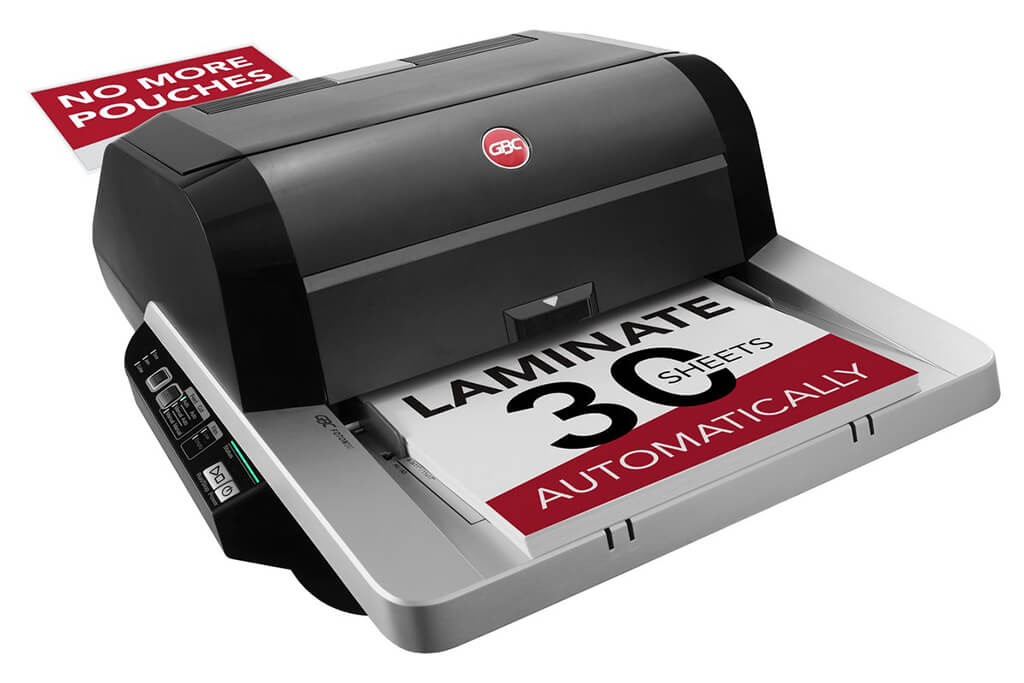
Image Source: ACCO Brands Corporation Official Site
(https://www.gbc-machines.com/products/gbc-foton-30-automatic-laminator)
(https://www.gbc-machines.com/products/gbc-foton-30-automatic-laminator)
Example facilities
Schools, hospitals, municipalities, etc.
Reasons for recommendation
Automates small-scale operations with fewer personnel
- With the push of a button, automatically laminates 30 sheets of A4 paper in 15 minutes. Its size allows it to be placed on a desk, making it easy to install.
- By fully automating the process from feeding to lamination, it enables the handling of jobs with low daily processing volumes in parallel with other operations.
The fact that it does not require dedicated operators or subsequent processes makes it suitable for small-scale sites.
| Maximum processing speed | 7.0 m/min |
|---|---|
| Maximum width | 297 mm (A3 compatible) |
| Warm-up | about 4 minutes |
| Processing type | roll type, double-sided (with borders) |
| Voltage (CE) | AC220 to 240V |
| Main unit dimensions | W 580 mm / D 440 mm / H 250 mm |
[About 1,000+ sheets per month]
Medium-lot production
Medium-lot production
Revo-Flex
(Lami Corporation)
(Lami Corporation)
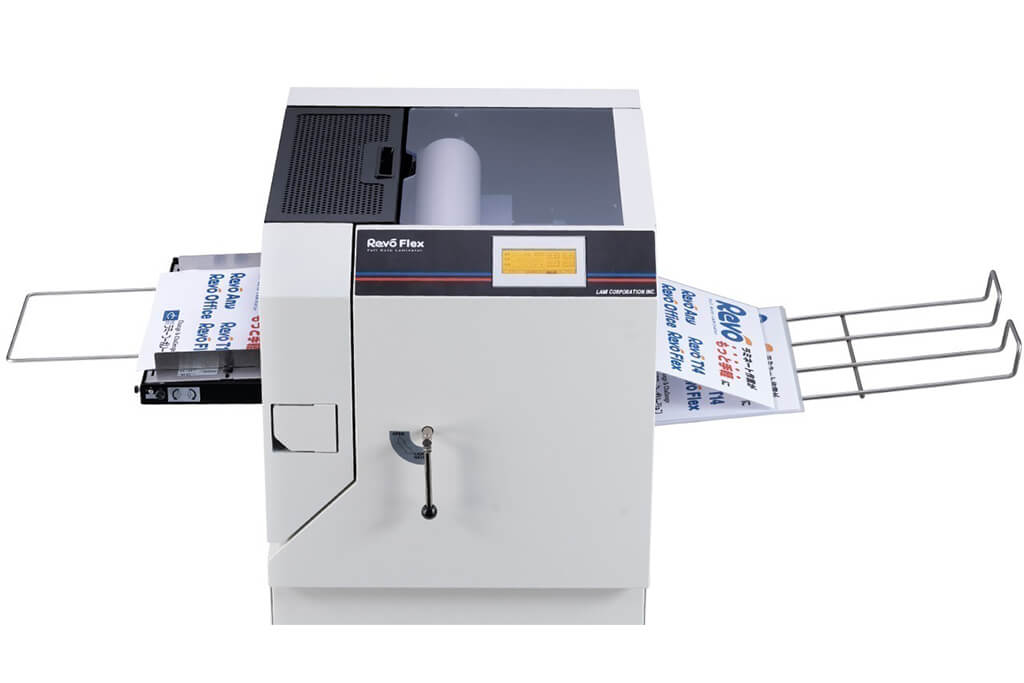
Image source: LAMI Corporation Official Website
(https://www.lami-corporation.co.jp/english/products/detail/51)
(https://www.lami-corporation.co.jp/english/products/detail/51)
Example facilities
Output centers, design offices, franchise headquarters, etc.
Reasons for recommendation
High-mix, fast-turnaround jobs are efficient through process reduction
- Completes trimming simultaneously with lamination, eliminating the need to move to subsequent processes or separate equipment.
Eliminates bottlenecks that tend to occur in on-demand printing and production sites. - High-precision automatic four-side trimming reduces trimming errors resulting from manual work, reducing film loss and the hassle of reprinting.
Even at sites with high-mix, small-lot production, it processes efficiently with consistent quality.
| Maximum processing speed | 2.0 m/min |
|---|---|
| Maximum width | 320 mm (SRA3 standard) |
| Warm-up | about 5 minutes *1 |
| Processing type | roll type, double-sided (border on/off selectable) |
| Voltage (CE) | AC230V |
| Main unit dimensions | W 1,300 mm / D 610 mm / H 1,080 mm *2 |
[10,000+ sheets per month]
High-lot production
High-lot production
Mini 76 TH
(Autobond Laminating)
(Autobond Laminating)
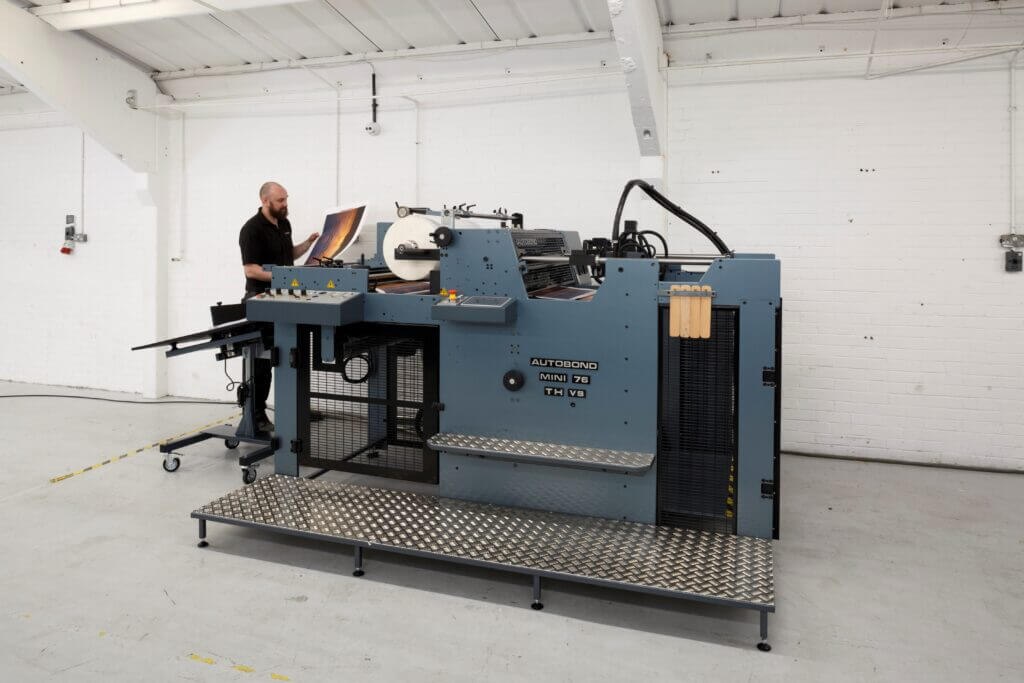
Image source: AUTOBOND Official Website
(https://www.autobondlaminating.com/machinery/thermal-lamination/mini/mini-76-th/)
(https://www.autobondlaminating.com/machinery/thermal-lamination/mini/mini-76-th/)
Example facilities
Printing factories, bookbinding lines, etc.
Reasons for recommendation
High-speed, continuous processing that can be integrated into mass-production lines
- Uses a steel side plate with a thickness of 20 mm described as sturdy like a tank. This rigid structure physically eliminates vibrations even at high-speed operations of 60 m per minute, maintaining stable processing accuracy.
- With a processing capacity of 60 m per minute, it can continuously handle large-format prints stably.
It demonstrates its true value when introduced as a part of a production line rather than as a standalone machine.
| Maximum processing speed | 60.0 m/min |
|---|---|
| Maximum width | 760 mm (B1+ compatible) |
| Warm-up | inquire for details |
| Processing type | roll type, single-sided or double-sided (borderless) |
| Voltage (CE) | inquire for details |
| Main unit dimensions | inquire for details |
*1. At 100°C (212°F) setting
*2. Dimensions when assembled, including the stand, tray, etc.