
Laminator Rollers
Index
Laminator rollers move materials through the machine and apply the pressure needed for consistent adhesion. In thermal laminators, heated rollers also activate the film adhesive. Before replacing a roller, check the film, temperature, loading, and cleaning instructions for your machine. Roller systems vary among pouch, roll, wide-format, and fully automatic laminators, so a procedure written for one model may be unsafe for another.
Note: Laminator rollers are machine components. They are different from laminating rolls, which are rolls of film loaded into a roll laminator. If you are selecting film rather than replacing a machine component, see our guide to laminating rolls and films.
Key Takeaways
- Depending on the machine design, a laminator may use heat, pressure, feed, capture, or output rollers.
- Marks, feeding problems, bubbles, and damaged output do not necessarily mean a roller needs to be replaced. Check the settings, film compatibility, loading, and roller cleanliness first.
- Clean rollers only as directed in the manual for your model. The required machine condition, tools, and cleaning products vary.
- Before ordering or replacing a roller, confirm the model, serial number, part number, service requirements, and warranty restrictions.
What Do Laminator Rollers Do?
Rollers move film and substrates through a laminator under controlled pressure. Thermal systems use heat and pressure to bond film to a document. Pressure-sensitive systems apply film without the same heating process.
A laminator may contain several groups of rollers. Names and functions vary by manufacturer, but the following terms commonly appear in product manuals:
| Roller type | Typical function | What contamination may affect |
|---|---|---|
| Heat or laminating roller | Applies heat and pressure during thermal lamination | Adhesion and finish quality |
| Pressure or nip roller | Applies controlled pressure to film and media | Pressure consistency and surface finish |
| Feed or capture roller | Moves sheets into the laminating section | Sheet pickup and feeding reliability |
Manufacturers do not use these labels consistently across all machines. Refer to the parts diagram in your manual to identify a roller before cleaning it or ordering a replacement.
Roller Problems and What to Check First
Most output problems have more than one possible cause. Check the consumables and operating conditions before assuming a roller has failed.
| Observed problem | Possible roller-related cause | Other checks to make first |
|---|---|---|
| Repeating marks or residue | Adhesive or dirt on a roller; possible surface damage | Inspect the film and document surfaces for contamination. |
| Pouch or film damage | Adhesive contamination or a damaged roller | Confirm the material thickness, feed direction, and alignment. |
| Poor or inconsistent feeding | Dirty feed or capture roller | Check the sheet position, paper weight, film loading, and roller path for obstructions. |
| Waves, bubbles, or weak adhesion | Uneven roller contact | Confirm the material thickness, temperature, speed, pressure, and compatibility. |
| Jam or film wrapping | Adhesive buildup interfering with material transport | Check the loading, feed direction, thickness, alignment, and recommended jam-recovery procedure. |
| Unusual noise or repeated stoppage | A roller, bearing, gear, or drive component may need inspection | Stop the machine and follow the manual. Do not remove service panels unless you are authorized to do so. |
If the defect remains after you have checked the film, settings, and approved cleaning procedures, record the symptoms and contact the manufacturer, dealer, or service provider. Photos of the roller and sample output may help the service team diagnose the problem.
Should You Clean or Replace the Rollers?
Cleaning is usually the first step when a roller has visible dust or adhesive residue and the manual includes an operator cleaning procedure. Request a professional inspection if cleaning does not correct a recurring defect, the roller appears damaged, the machine makes an unusual noise, or an error continues after the documented recovery procedure.
Replace a roller only after confirming which part is defective and whether the replacement is compatible with your machine. The availability of a service part number does not necessarily mean the operator can install it. Check the manual, warranty terms, or service requirements before proceeding.
How to Clean Laminator Rollers Safely
Start with the instructions for your exact model. One machine may require a cleaning sheet, while another may call for a soft cloth. A production laminator may need to be disconnected and allowed to cool before maintenance.
- Identify the model and follow its shutdown, unplugging, cooling, or warm-cleaning procedure.
- Use only the cloth, cleaning sheet, wipe, or cleaning product recommended by the manufacturer.
- Keep blades, metal brushes, scouring pads, and other hard tools away from the rollers.
- Reinstall the film or close all access points as instructed, then test the machine with a noncritical sheet.
Do not use a solvent simply because another laminator manufacturer permits it. Even alcohol-based cleaning is model-specific. Unsupported liquids and cleaning materials may damage roller surfaces and affect warranty coverage.
For a broader maintenance routine covering film paths, jams, daily checks, and operator practices, read the Laminator Maintenance Guide.
Can Laminator Rollers Be Replaced?
Replacement rollers are available for some professional laminators, but part availability and installation requirements depend on the model. A published part number does not mean the user is authorized to perform the repair.
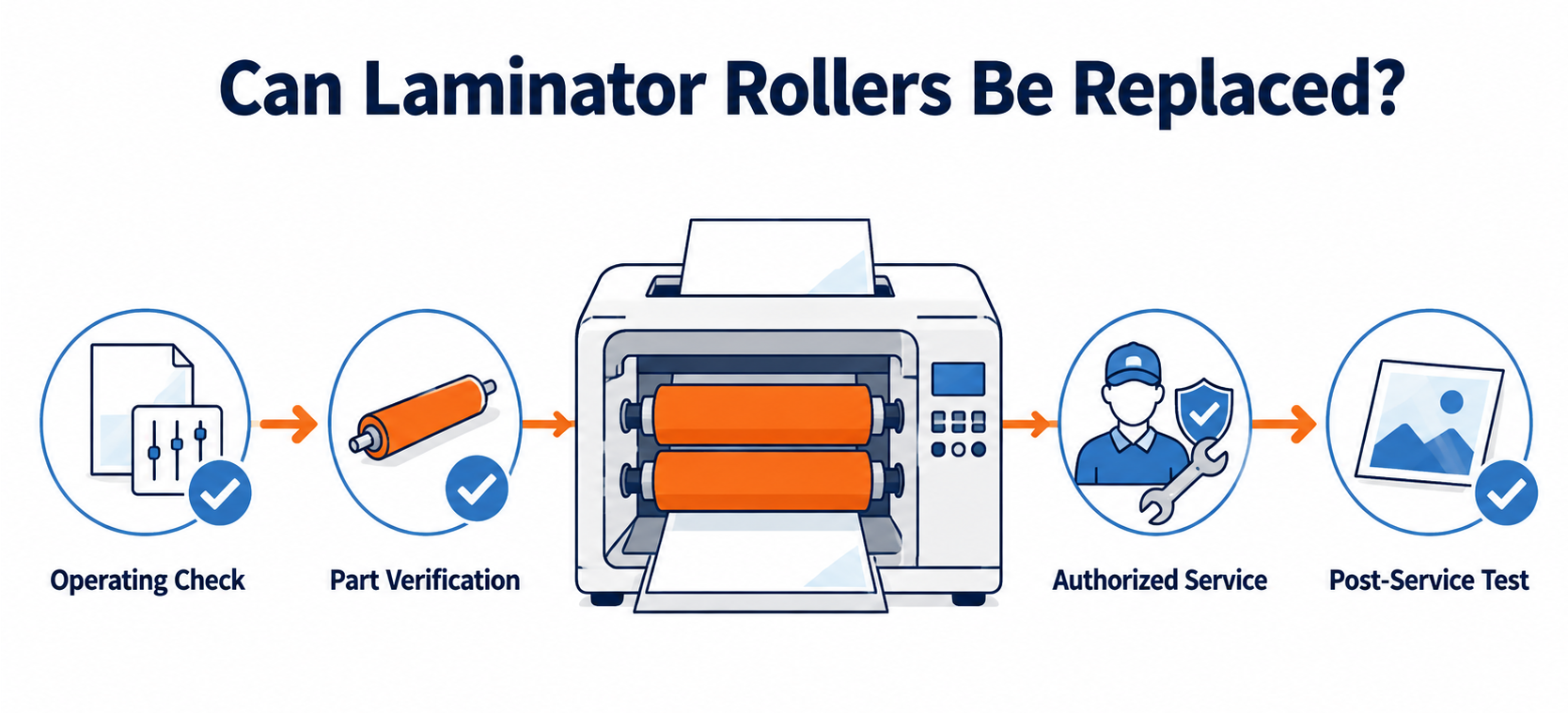
Before disassembling the machine, follow these steps:
- Rule out operating causes. Check the film, settings, loading, and approved cleaning procedures.
- Document the problem. Record its location and frequency, along with any error codes, unusual sounds, and changes after cleaning.
- Identify the machine. Note the manufacturer, model, serial number, and name of the affected roller.
- Verify the service part. Ask for the current part number and a list of included components.
- Check who may install it. Review the manual and warranty before removing any covers.
- Test the machine after service. Check feeding and finish quality with noncritical material.
A generic replacement procedure is not safe for every laminator. Temperature, pressure, pinch points, electrical connections, sensors, and drive components differ by design.
What to Check When Ordering Replacement Rollers
Rollers that look alike may not fit or perform the same way. Give the service team or parts supplier machine-specific information:
| Information to confirm | Why it matters |
|---|---|
| Manufacturer, model, and serial number | Identifies the machine configuration and production revision. |
| Roller name and position | Distinguishes among heat, pressure, feed, capture, and output components. |
| Official part number and description | Verifies compatibility more reliably than dimensions alone. |
| Included components | Clarifies whether bearings, gears, shafts, or mounting hardware are sold separately. |
| Installation requirements | Confirms whether an authorized technician must perform the work. |
| Warranty and service availability | Helps prevent unauthorized repairs and provides a basis for estimating downtime. |
Use measurements such as roller width and diameter only as supporting information. They do not replace verification by model and official part number.
How to Reduce Laminator Roller Wear
Proper operation helps limit roller contamination and damage. Use supported films and substrates, load film as instructed, and adjust pressure or tension only through the machine's approved controls.
- Remove adhesive residue according to the maintenance schedule and cleaning method for your model.
- Keep documents and the feed area free of dust, loose scraps, and foreign objects.
- Never scrape a roller with a knife, razor, metal brush, or scouring pad.
- Do not force jammed film or documents through the roller path.
- Store the machine in the position specified by the manufacturer, including separating the rollers when required.
- Record recurring defects so you can distinguish loading errors from equipment problems.
Before buying a laminator, review its roller access, cleaning instructions, parts availability, and service response. These factors can determine how quickly production resumes after a roller problem.
CHECK
Which Fully Automatic Laminator Fits Your Production Workflow?
Roller access, cleaning procedures, replacement parts, and service requirements vary by laminator type and model. Machines that are difficult to maintain can cause longer production interruptions when roller problems occur.
If cleaning, repairs, or recurring feeding problems are disrupting production, compare fully automatic laminators based on the application, production volume, supported formats, maintenance access, consumable availability, and service support.
FAQs About Laminator Rollers
Q. What is the difference between laminator rollers and laminating rolls?
A. Laminator rollers are components inside the machine that apply pressure, supply heat, or transport material. Laminating rolls are consumable rolls of film loaded into a roll laminator.
Q. How do I know if my laminator rollers need to be replaced?
A. Check the film, settings, loading, and approved cleaning procedures first. Request an inspection if the defect continues, the roller is visibly damaged, the machine makes an unusual noise, or the documented troubleshooting steps do not resolve the problem.
Q. Can I replace laminator rollers myself?
A. You should replace them only if the manufacturer provides an operator procedure for your model. Many manufacturers limit internal repairs to authorized service personnel. Unauthorized work may create a safety risk or affect warranty coverage.
Q. How often should laminator rollers be cleaned?
A. Follow the maintenance schedule in the manual for your model. Cleaning frequency depends on the machine, film, workload, and amount of residue. Do not apply one model's schedule to another machine.
Q. Why does film stick to laminator rollers?
A. Incorrect loading, unsupported materials, or exposed adhesive can cause film or adhesive to stick to a roller. Follow the model-specific recovery and cleaning instructions instead of pulling the film out by force.
Q. Should I replace the rollers or buy a new laminator?
A. Compare the repair cost and expected downtime with the machine's age, role in production, parts availability, and repair history. If service delays or recurring faults are disrupting production, evaluate replacement machines against your current workload and service requirements.
Conclusion
Laminator rollers control heat, pressure, feeding, or output transport, depending on the machine. Before concluding that a roller has failed, check the materials, settings, loading, and approved cleaning procedures. If the problem continues, identify the affected roller and verify the official replacement part and service procedure. For operations dealing with recurring downtime, maintenance access and service support deserve the same attention as speed, format, and production capacity.
[Advertisement]
[By production scale]
Three Fully Automatic Laminators
[By production scale]
Three Fully Automatic Laminators
When choosing a fully automatic laminator, it is important to base your decision on the volume you process in a day rather than the size of the main unit or equipment scale.
This is an introduction to fully automatic laminators that match the workload and operational style of different production scales.
Advertiser Disclosure:
We receive compensation from some of the companies listed below.This compensation may affect which companies are included and the order in which they appear.
[About 100+ sheets per month]
Small-lot production
Small-lot production
GBC Foton 30
(ACCO Brands Corporation)
(ACCO Brands Corporation)
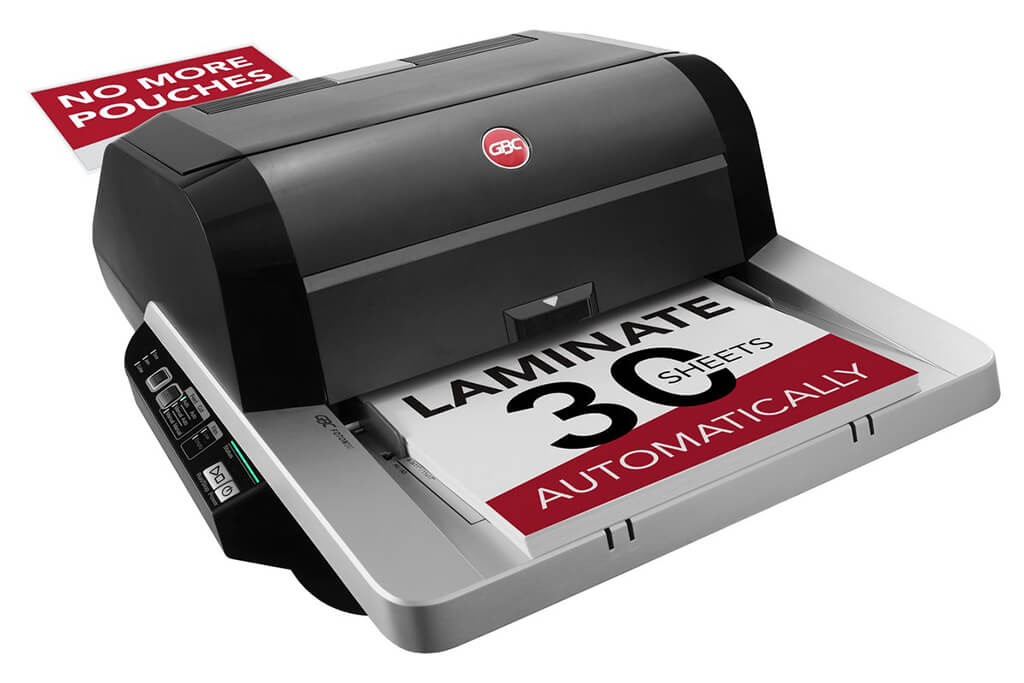
Image Source: ACCO Brands Corporation Official Site
(https://www.gbc-machines.com/products/gbc-foton-30-automatic-laminator)
(https://www.gbc-machines.com/products/gbc-foton-30-automatic-laminator)
Example facilities
Schools, hospitals, municipalities, etc.
Reasons for recommendation
Automates small-scale operations with fewer personnel
- With the push of a button, automatically laminates 30 sheets of A4 paper in 15 minutes. Its size allows it to be placed on a desk, making it easy to install.
- By fully automating the process from feeding to lamination, it enables the handling of jobs with low daily processing volumes in parallel with other operations.
The fact that it does not require dedicated operators or subsequent processes makes it suitable for small-scale sites.
| Maximum processing speed | 7.0 m/min |
|---|---|
| Maximum width | 297 mm (A3 compatible) |
| Warm-up | about 4 minutes |
| Processing type | roll type, double-sided (with borders) |
| Voltage (CE) | AC220 to 240V |
| Main unit dimensions | W 580 mm / D 440 mm / H 250 mm |
[About 1,000+ sheets per month]
Medium-lot production
Medium-lot production
Revo-Flex
(Lami Corporation)
(Lami Corporation)
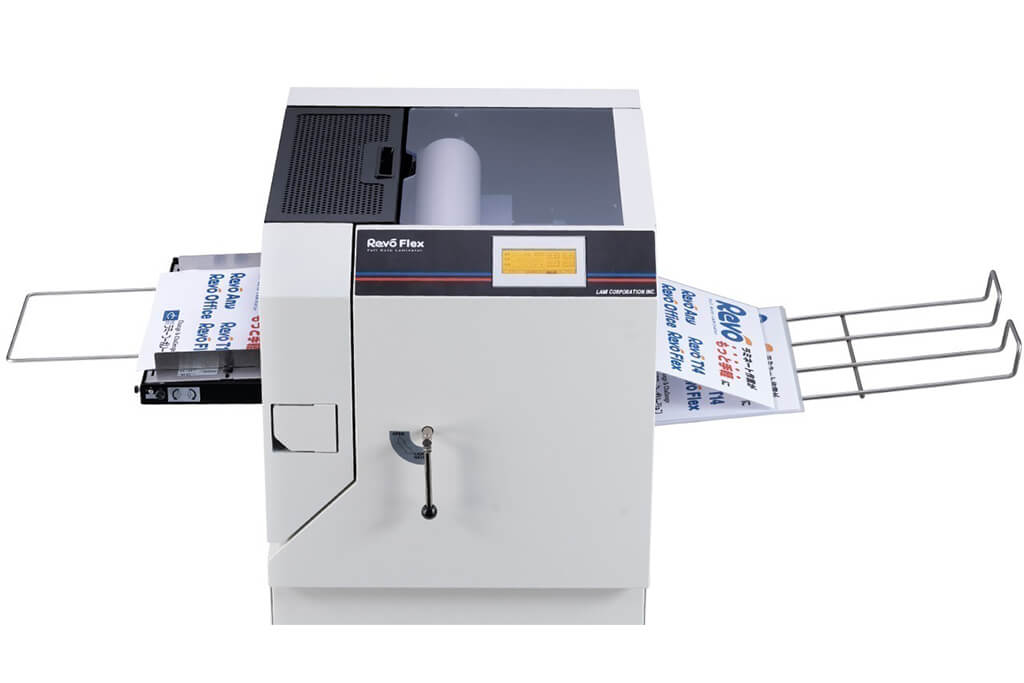
Image source: LAMI Corporation Official Website
(https://www.lami-corporation.co.jp/english/products/detail/51)
(https://www.lami-corporation.co.jp/english/products/detail/51)
Example facilities
Output centers, design offices, franchise headquarters, etc.
Reasons for recommendation
High-mix, fast-turnaround jobs are efficient through process reduction
- Completes trimming simultaneously with lamination, eliminating the need to move to subsequent processes or separate equipment.
Eliminates bottlenecks that tend to occur in on-demand printing and production sites. - High-precision automatic four-side trimming reduces trimming errors resulting from manual work, reducing film loss and the hassle of reprinting.
Even at sites with high-mix, small-lot production, it processes efficiently with consistent quality.
| Maximum processing speed | 2.0 m/min |
|---|---|
| Maximum width | 320 mm (SRA3 standard) |
| Warm-up | about 5 minutes *1 |
| Processing type | roll type, double-sided (border on/off selectable) |
| Voltage (CE) | AC230V |
| Main unit dimensions | W 1,300 mm / D 610 mm / H 1,080 mm *2 |
[10,000+ sheets per month]
High-lot production
High-lot production
Mini 76 TH
(Autobond Laminating)
(Autobond Laminating)
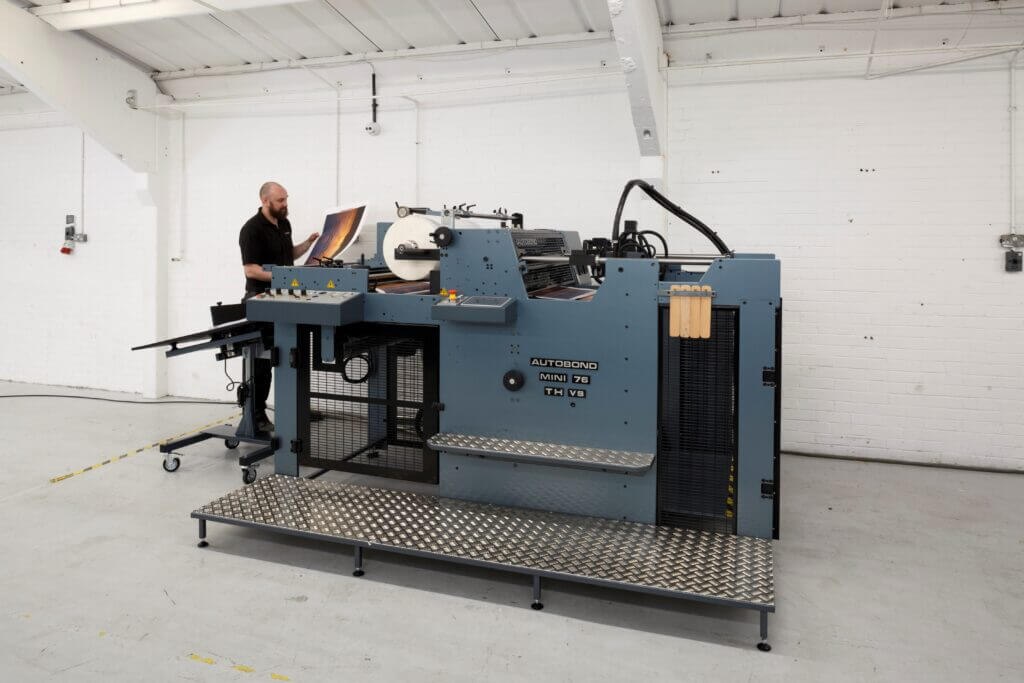
Image source: AUTOBOND Official Website
(https://www.autobondlaminating.com/machinery/thermal-lamination/mini/mini-76-th/)
(https://www.autobondlaminating.com/machinery/thermal-lamination/mini/mini-76-th/)
Example facilities
Printing factories, bookbinding lines, etc.
Reasons for recommendation
High-speed, continuous processing that can be integrated into mass-production lines
- Uses a steel side plate with a thickness of 20 mm described as sturdy like a tank. This rigid structure physically eliminates vibrations even at high-speed operations of 60 m per minute, maintaining stable processing accuracy.
- With a processing capacity of 60 m per minute, it can continuously handle large-format prints stably.
It demonstrates its true value when introduced as a part of a production line rather than as a standalone machine.
| Maximum processing speed | 60.0 m/min |
|---|---|
| Maximum width | 760 mm (B1+ compatible) |
| Warm-up | inquire for details |
| Processing type | roll type, single-sided or double-sided (borderless) |
| Voltage (CE) | inquire for details |
| Main unit dimensions | inquire for details |
*1. At 100°C (212°F) setting
*2. Dimensions when assembled, including the stand, tray, etc.