
Roll Laminators
Index
A roll laminator applies film from one or more supply rolls while printed material passes between a set of rollers. Depending on the machine and film, heat, pressure, or both activate the adhesive and bond the film to the material.
Roll laminators range from compact desktop models to wide-format and production systems. The right configuration depends on the material, finished size, run length, required finish, and how much feeding, cutting, and handling is left to the operator.
Key Takeaways
- Start with the bonding method. Thermal film requires heat, while pressure-sensitive film works for applications that cannot use full thermal lamination.
- Match the machine's width, film specifications, roller gap, and media capacity to the jobs you produce.
- Compare total job time, not just rated speed. Setup, film loading, feeding, separation, trimming, and cleanup all affect throughput.
- Consider roll format and automation separately. A machine may use roll film while still requiring the operator to complete several production steps.
What Is a Roll Laminator and How Does It Work?
A roll laminator feeds film into the point where two rollers meet, known as the nip. The rollers apply controlled pressure as the film and printed material move through the machine. Thermal systems heat the adhesive layer, while cold systems use pressure-sensitive adhesive.
Pouch lamination works differently: the operator places each item in a separate pouch. Roll film is better suited to repeated jobs and custom formats that fall within the machine's width and thickness limits.
The film width, thickness, roll diameter, and core size must match the machine. Some pressure-sensitive films also require a rewinder for the release liner. Check the laminator documentation and the film supplier's instructions before use.
Source: Drytac JetMounter Operator's Manual
([https://www.drytac.com/wp-content/uploads/2020/10/Drytac_JetMounter_JM1834_Operators_Manual.pdf](https://www.drytac.com/wp-content/uploads/2020/10/Drytac_JetMounter_JM1834_Operators_Manual.pdf))
([https://www.drytac.com/wp-content/uploads/2020/10/Drytac_JetMounter_JM1834_Operators_Manual.pdf](https://www.drytac.com/wp-content/uploads/2020/10/Drytac_JetMounter_JM1834_Operators_Manual.pdf))
Main Types of Roll Laminators
Roll laminators are usually classified by bonding method and production format. These categories overlap. For example, a wide-format machine may work with cold film, heat-assist film, or both thermal and pressure-sensitive film.
Thermal Roll Laminators
Thermal roll laminators use heat-activated film. Heated rollers or another heating system bring the adhesive to its working temperature, while roller pressure bonds the film to the printed material.
These machines require warm-up time and settings suited to the film and substrate. Always test heat-sensitive media, as temperature may affect certain inks, coatings, plastics, and photographs.
Cold and Heat-Assist Roll Laminators
Cold roll laminators use roller pressure to bond pressure-sensitive film. They are commonly used for mounting, signs, and graphics that require pressure-sensitive adhesives.
Some machines have a heated top roller or another heat-assist function. Settings and compatible films vary by model, so check the hot vs. cold lamination guide and the manufacturer's documentation before processing unfamiliar media.
Desktop, Wide-Format, and Production Systems
Desktop roll laminators have a smaller footprint and generally handle narrower media. Wide-format machines accommodate larger graphics and may include mounting gaps or rewind options. Production systems offer greater capacity and may add functions such as gap control, perforation, separation, automatic feeding, or stacking.
Size alone does not determine a machine's capacity. Consider the job width, media path, setup requirements, and downstream handling needed for your work.
Roll Laminator vs. Pouch Laminator
Roll and pouch laminators can both protect and finish printed material, but their workflows differ. Base your choice on the workflow and required output format, not just the machine category.
| Factor | Roll Laminator | Pouch Laminator |
|---|---|---|
| Film format | Film supplied on rolls or in a roll-film cartridge | Pre-cut pouch for each item |
| Typical workflow | Film is loaded for a batch of items or a continuous job | Each item is placed in a pouch before feeding |
| Document size | Determined mainly by the maximum working width and media path | Determined mainly by the supported pouch sizes |
| Batch handling | Reduces repeated pouch preparation for batch work | Suitable for intermittent, one-at-a-time jobs |
| Operator involvement | Varies widely; feeding, alignment, separation, and trimming may remain manual | Usually requires the operator to prepare and feed each pouch |
| Finishing | Output may require separation and edge trimming | The pouch provides a preformed sealed edge |
| Typical applications | Posters, signs, mounted graphics, teaching materials, and print finishing | Notices, menus, cards, certificates, and individual documents |
Common Applications for Roll Laminators
Working width, film type, and roller configuration determine which applications a roll laminator can handle. Common examples include:
- Offices and schools: teaching aids, notices, maps, signs, and frequently handled documents
- Print and copy shops: posters, menus, covers, photographs, and short-run print jobs
- Sign and graphics production: displays, mounted graphics, wide-format prints, and pressure-sensitive overlaminates
- Commercial print finishing: covers, promotional materials, and repeat jobs that follow a defined finishing workflow
A listed application does not guarantee compatibility with every material. Check the documented specifications and testing requirements for boards, wide-format graphics, inks, and outdoor films.
How to Choose a Roll Laminator
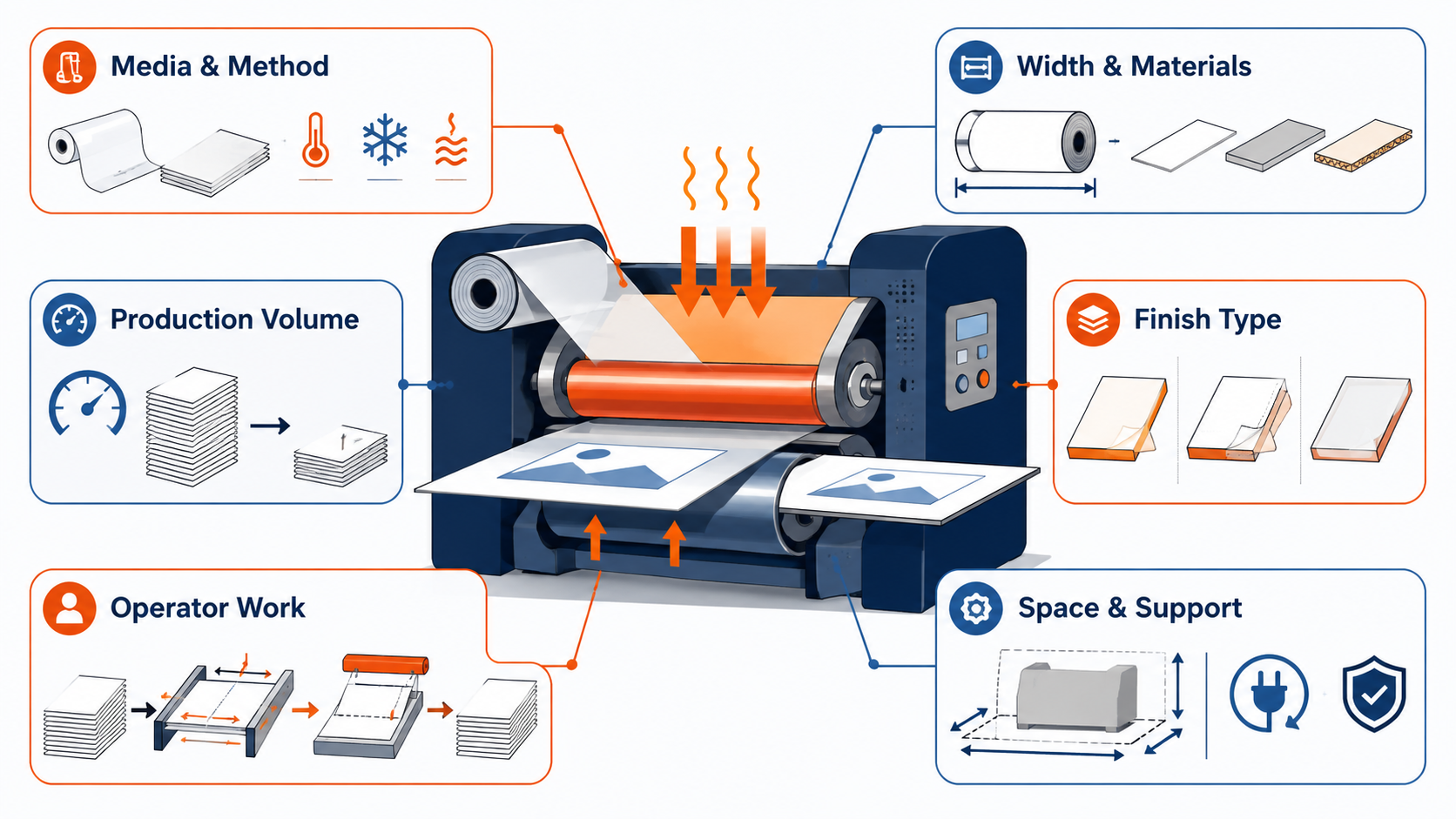
Before comparing models, document the media, finished dimensions, run length, film construction, and required operator steps.
1. Match the Lamination Method to the Media
Determine whether the material and film require thermal, cold, or heat-assist processing. Thermal film must reach its specified activation range. Pressure-sensitive film depends on the correct pressure and may require a liner take-up system.
Check compatibility with heat-sensitive prints, specialty coatings, photographs, synthetic media, and unfamiliar inks. Test the proposed temperature, speed, and pressure before running a full batch.
2. Check Width, Film, and Substrate Compatibility
Choose a working width that allows for your widest regular job and the necessary film margin. Check film thickness, core size, roll diameter, substrate thickness, and mounting gap.
A wide machine will not necessarily accept every rigid material. For encapsulation, check the upper and lower film capacity. For pressure-sensitive work, review the supply and rewind configuration. See the laminating rolls and films guide for more information about film selection.
3. Evaluate Speed and Actual Production Volume
Rated speed tells only part of the story. Include warm-up, film loading, machine setup, feeding, alignment, separation, trimming, and changeover time.
Automatic feeding or trimming may reduce operator time even if the machine's rated speed is lower. For occasional work, however, extra automation may add more setup than it saves. Compare representative jobs using the same finished-output requirements.
4. Choose Between One-Sided, Two-Sided, and Encapsulation Work
Determine whether each job requires film on one side, both sides, or beyond all four edges. Applying film to both sides does not necessarily produce the same edge finish as encapsulation.
Check the film shafts, pressure controls, separation method, and border handling needed for the required finish.
5. Account for Feeding, Trimming, and Operator Work
List every manual step from loading the input stack to collecting the finished output. The operator may still need to align sheets, maintain gaps, monitor skew, separate items, trim edges, or collect completed work.
Depending on the machine, automation may handle feeding, gap control, skew correction, perforation, bursting, trimming, rewinding, or stacking. Check which functions are standard, which are optional, and which media sizes each function supports.
6. Check Space, Power, Safety, and Support Requirements
Allow enough room for film rolls, feed tables, output trays, front and rear access, and material handling. Check the voltage, power requirements, ventilation guidance, machine weight, and required installation surface.
The roller nip is a pinch hazard. Follow the manufacturer's instructions, keep hands, hair, jewelry, and loose clothing away from moving rollers, and disconnect the machine as instructed before cleaning or servicing it. You should also check the availability of training, spare parts, consumables, and technical support.
Operating Requirements That Are Easy to Overlook
Film loading and changeovers can have a substantial effect on daily capacity. Record the time and material needed to thread a roll, set the tension, reach the operating temperature, check alignment, and approve the first piece.
Finished output may still need to be separated or trimmed. Perforation, bursting, and automatic edge trimming change the downstream workflow, so assign responsibility for each remaining step.
Plan regular roller cleaning, adhesive removal, safety checks, and maintenance. Follow the machine manual instead of using the same cleaning method for every roller or adhesive system.
Source: Drytac JetMounter Operator's Manual
([https://www.drytac.com/wp-content/uploads/2020/10/Drytac_JetMounter_JM1834_Operators_Manual.pdf](https://www.drytac.com/wp-content/uploads/2020/10/Drytac_JetMounter_JM1834_Operators_Manual.pdf))
([https://www.drytac.com/wp-content/uploads/2020/10/Drytac_JetMounter_JM1834_Operators_Manual.pdf](https://www.drytac.com/wp-content/uploads/2020/10/Drytac_JetMounter_JM1834_Operators_Manual.pdf))
When Is Full Automation Worth Considering?
Full automation becomes relevant when feeding, alignment, separation, trimming, or stacking restricts output. To identify the bottlenecks, track operator time, changeovers, rework, and queue time across representative jobs.
Automation changes the production workflow, but operators must still check the media and film. Compare the automated steps, supported formats, expected volume, and tasks that remain manual.
CHECK
Which Level of Roll-Laminating Automation Fits Your Workflow?
Roll-film systems range from operator-fed machines to equipment that handles feeding, lamination, trimming, and output as one coordinated process. Choose the level of automation based on production volume, job variety, format range, and the delays in your current workflow.
Compare automatic laminators by production scale, then review the documented width, speed, film format, feeding and trimming functions, installation requirements, and remaining operator tasks.
FAQs About Roll Laminators
What is the main difference between a roll laminator and a pouch laminator?
A roll laminator supplies film from a roll or cartridge, while a pouch laminator uses a pre-cut pouch for each item. Each format has a different setup and finishing workflow.
Can one roll laminator handle both hot and cold lamination?
Some models support both methods, while others support only one. Check the heating system, pressure controls, film specifications, and liner rewinder requirements.
Can roll laminators laminate one side and both sides?
Some models laminate one side, while others apply film to both sides or support encapsulation and mounting. Check the film-shaft configuration and finished-edge requirements.
What roll laminator width should I choose?
Start with your widest regular job, then allow for the required film margin and feeding clearance. Check the supported substrate thickness and roll dimensions at that width.
Does using roll film mean the laminator is fully automatic?
No. Roll film describes how the film is supplied. Feeding, alignment, separation, trimming, rewinding, and stacking may still be manual.
[Advertisement]
[By production scale]
Three Fully Automatic Laminators
[By production scale]
Three Fully Automatic Laminators
When choosing a fully automatic laminator, it is important to base your decision on the volume you process in a day rather than the size of the main unit or equipment scale.
This is an introduction to fully automatic laminators that match the workload and operational style of different production scales.
Advertiser Disclosure:
We receive compensation from some of the companies listed below.This compensation may affect which companies are included and the order in which they appear.
[About 100+ sheets per month]
Small-lot production
Small-lot production
GBC Foton 30
(ACCO Brands Corporation)
(ACCO Brands Corporation)
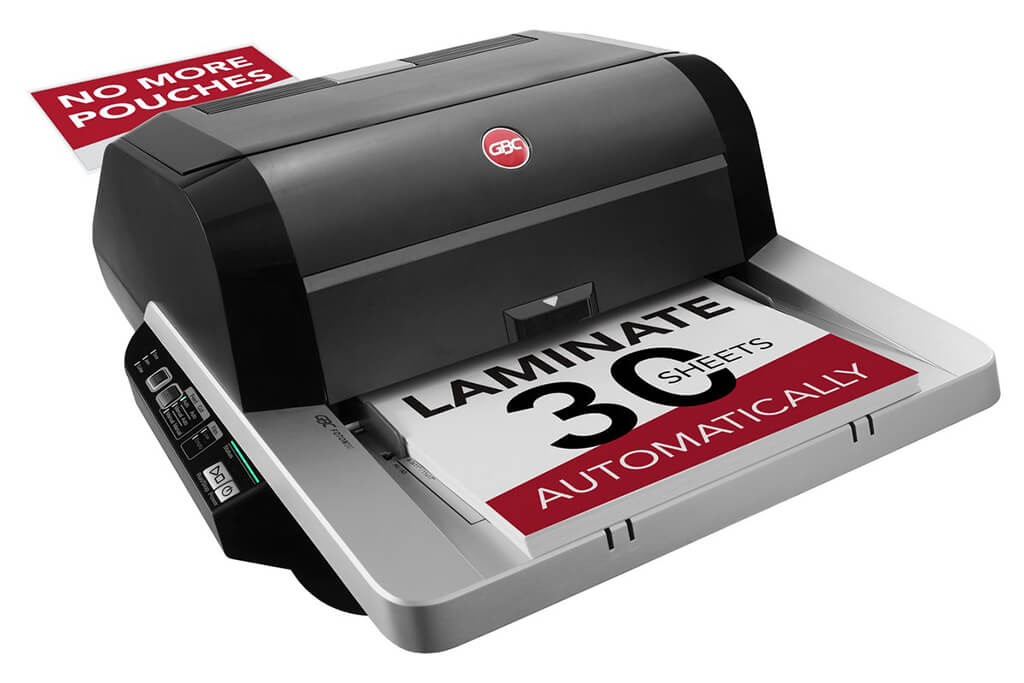
Image Source: ACCO Brands Corporation Official Site
(https://www.gbc-machines.com/products/gbc-foton-30-automatic-laminator)
(https://www.gbc-machines.com/products/gbc-foton-30-automatic-laminator)
Example facilities
Schools, hospitals, municipalities, etc.
Reasons for recommendation
Automates small-scale operations with fewer personnel
- With the push of a button, automatically laminates 30 sheets of A4 paper in 15 minutes. Its size allows it to be placed on a desk, making it easy to install.
- By fully automating the process from feeding to lamination, it enables the handling of jobs with low daily processing volumes in parallel with other operations.
The fact that it does not require dedicated operators or subsequent processes makes it suitable for small-scale sites.
| Maximum processing speed | 7.0 m/min |
|---|---|
| Maximum width | 297 mm (A3 compatible) |
| Warm-up | about 4 minutes |
| Processing type | roll type, double-sided (with borders) |
| Voltage (CE) | AC220 to 240V |
| Main unit dimensions | W 580 mm / D 440 mm / H 250 mm |
[About 1,000+ sheets per month]
Medium-lot production
Medium-lot production
Revo-Flex
(Lami Corporation)
(Lami Corporation)
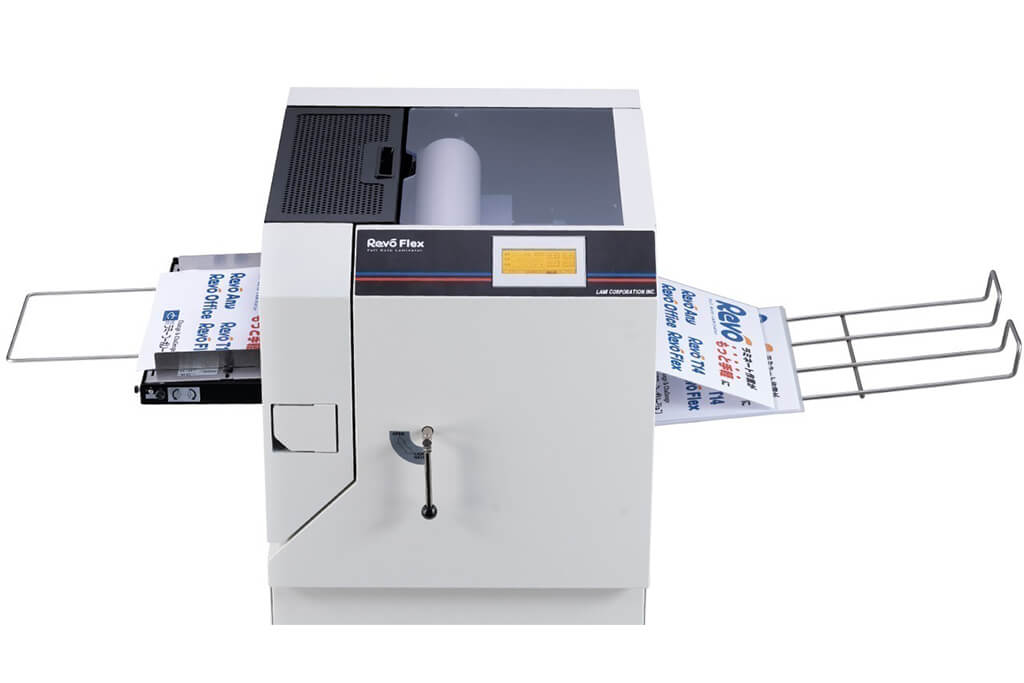
Image source: LAMI Corporation Official Website
(https://www.lami-corporation.co.jp/english/products/detail/51)
(https://www.lami-corporation.co.jp/english/products/detail/51)
Example facilities
Output centers, design offices, franchise headquarters, etc.
Reasons for recommendation
High-mix, fast-turnaround jobs are efficient through process reduction
- Completes trimming simultaneously with lamination, eliminating the need to move to subsequent processes or separate equipment.
Eliminates bottlenecks that tend to occur in on-demand printing and production sites. - High-precision automatic four-side trimming reduces trimming errors resulting from manual work, reducing film loss and the hassle of reprinting.
Even at sites with high-mix, small-lot production, it processes efficiently with consistent quality.
| Maximum processing speed | 2.0 m/min |
|---|---|
| Maximum width | 320 mm (SRA3 standard) |
| Warm-up | about 5 minutes *1 |
| Processing type | roll type, double-sided (border on/off selectable) |
| Voltage (CE) | AC230V |
| Main unit dimensions | W 1,300 mm / D 610 mm / H 1,080 mm *2 |
[10,000+ sheets per month]
High-lot production
High-lot production
Mini 76 TH
(Autobond Laminating)
(Autobond Laminating)
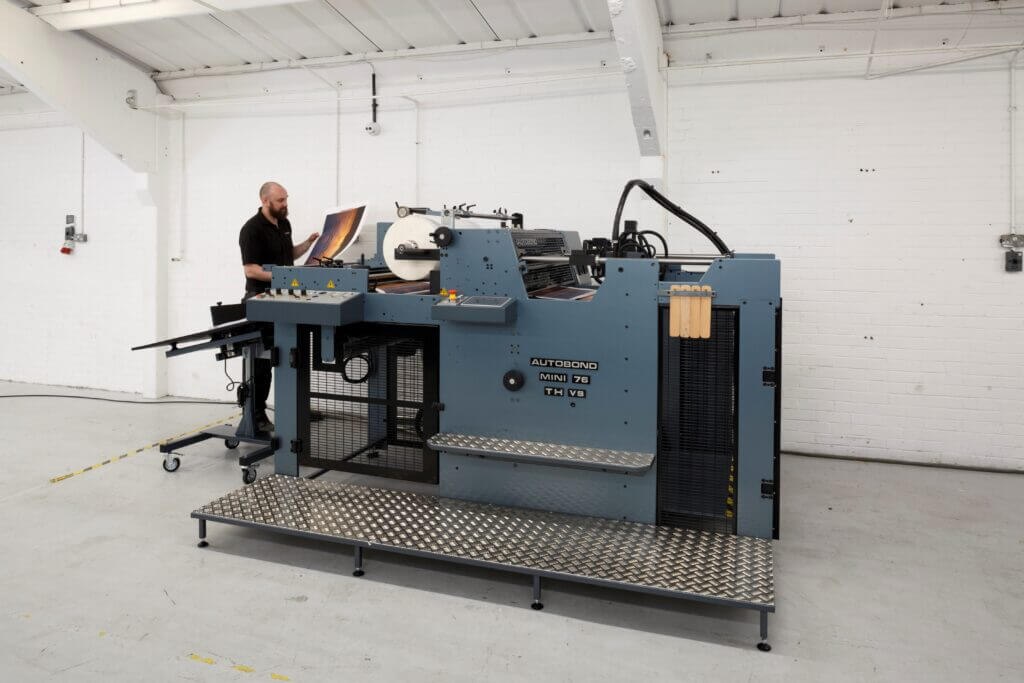
Image source: AUTOBOND Official Website
(https://www.autobondlaminating.com/machinery/thermal-lamination/mini/mini-76-th/)
(https://www.autobondlaminating.com/machinery/thermal-lamination/mini/mini-76-th/)
Example facilities
Printing factories, bookbinding lines, etc.
Reasons for recommendation
High-speed, continuous processing that can be integrated into mass-production lines
- Uses a steel side plate with a thickness of 20 mm described as sturdy like a tank. This rigid structure physically eliminates vibrations even at high-speed operations of 60 m per minute, maintaining stable processing accuracy.
- With a processing capacity of 60 m per minute, it can continuously handle large-format prints stably.
It demonstrates its true value when introduced as a part of a production line rather than as a standalone machine.
| Maximum processing speed | 60.0 m/min |
|---|---|
| Maximum width | 760 mm (B1+ compatible) |
| Warm-up | inquire for details |
| Processing type | roll type, single-sided or double-sided (borderless) |
| Voltage (CE) | inquire for details |
| Main unit dimensions | inquire for details |
*1. At 100°C (212°F) setting
*2. Dimensions when assembled, including the stand, tray, etc.