
A5 Laminator
This article explains A5 laminators from a business-use perspective, focusing on small-format documents, efficient handling, and consistent finishing quality.
Typical Applications and Where A5 Laminators Are Used
- Offices and administrative departments
ID cards, instruction sheets, internal notices, checklists, and frequently used reference materials - Schools and educational institutions
Flashcards, learning aids, small classroom signs, name cards, and reusable teaching materials - Retail stores and restaurants
Price cards, menu inserts, shelf labels, promotional tags, and small in-store notices - Healthcare and public facilities
Guidance cards, reception notices, procedure cards, and information sheets that need to remain clean and easy to read - Event and facility management teams
Badges, passes, table signs, queue cards, and small-format displays used repeatedly on-site
Why A5 Is Often the Preferred Size
A5 is often chosen because it is compact, easy to handle, and large enough to display practical information.
It provides sufficient space for short instructions, notices, labels, and reference materials without making the finished item bulky. While A4 is well suited to full-page documents, it can be unnecessarily large for materials that need to be carried, displayed in limited spaces, or distributed frequently. A5 is easier to store, share, and use at desks, counters, classrooms, and reception areas.
Another advantage is that A5 lamination can often be performed using compact machines, making it a practical option for workplaces with limited installation space.
A5 vs A4: Size Comparison
A5 is half the size of A4. It is a practical choice when information needs to remain visible without taking up unnecessary space.
In many workplaces, A4 is used for standard documents, while A5 is preferred for smaller materials such as notices, cards, tags, and quick-reference sheets. If both full-page documents and small-format materials are handled within the same workplace, it is important to confirm whether the laminator supports only A5 or can also accommodate larger sizes such as A4.
| Item | A5 | A4 |
|---|---|---|
| Size | 148×210 mm | 210×297 mm |
| Primary use | Small notices, cards, labels, and reference sheets | Standard documents, reports, manuals, and notices |
| Handling | Compact and easy to store | Better suited to full-page information |
Do You Need an A5 Laminator, or Is an A4 Laminator Better?
You rarely need a dedicated A5 laminator; an A4 or A3 laminator is almost always the better choice.
Laminators are inherently downward-compatible: any machine can safely feed and seal pouches narrower than its intake throat. Given market availability, cost-efficiency, and operational flexibility, purchasing a standard A4 unit—or scaling up to an A3 model for higher throughput—is far more practical.
Best Laminator by Use Case
Primarily Laminating A5
Recommendation: Standard A4 Laminator (Entry to mid-range)
Reason:
The laminator market is built around A4 and A3 standards. Dedicated "A5-only" models are rare, overpriced, and often stripped of key features. An A4 laminator handles off-the-shelf A5 pouches (typically 154 × 216 mm) seamlessly, while offering faster warm-up times, better temperature controls, and superior value due to mass production.
Laminating Both A5 and A4
Recommendation: Standard A4 Laminator
Reason:
A single A4 unit covers A4, A5, B5, postcards, photos, and business cards without modification. Buying separate units for A5 and A4 wastefully duplicates hardware and desk footprint.
Handling Multiple Sizes Up to A3
Recommendation: A3 Laminator
Reason:
If your workload ever includes menus, posters, signage, or presentation covers, an A3 machine eliminates all format limits. Because it processes everything from A3 down to business-card sizes, it provides the highest long-term utility if workspace allows.
Laminating Large Batches of A5 Repeatedly
Recommendation: A3 Laminator or High-Speed A4 Laminator (4 to 6 Rollers)
Reason:
For continuous, high-volume A5 runs, an A3 laminator offers a distinct mechanical advantage:
・Landscape feeding (Shortened pass-through): An A4 machine forces you to feed A5 pouches short-edge first (154 mm width), requiring the roller to travel the full 216 mm length. An A3 machine has the throat clearance to accept A5 pouches long-edge first (216 mm width), reducing travel distance to 154 mm and cutting processing time per sheet by roughly 30%.
・Thermal stability & durability: Continuous laminating leaches heat from rollers quickly. A 4- or 6-roller machine maintains stable heat distribution and stronger clamping force, preventing the clouding, curling, and jamming common in budget 2-roller machines.
Workflow Comparison
| Workflow | Recommended Laminator Size / Type | Reason |
|---|---|---|
| Primarily A5 | A4 Laminator (Standard 2-roller) | A5-dedicated units offer poor availability and limited features; standard A4 machines fit A5 pouches natively with far better value. |
| Mixed A5 & A4 | A4 Laminator (Standard 2 to 4-roller) | One machine covers all paper sizes A4 and below, keeping desktop clutter and equipment costs to a minimum. |
| Multiple Sizes (Up to A3) | A3 Laminator (Standard to high-performance) | Eliminates size constraints entirely, handling posters and menus as easily as standard documents and cards. |
| High-Volume A5 Batches | A3 Laminator or High-Speed A4 (4 to 6-roller) | An A3 throat allows long-edge (landscape) insertion, cutting pass-through time by ~30%. Multi-roller systems prevent heat drop and jams during sustained runs. |
Practical Tips for A5 Lamination
・Always use dedicated A5 pouches: Avoid laminating an A5 sheet inside an A4 pouch with the intention of trimming down the border afterward. Cutting off the factory-sealed margins breaks the perimeter seal, leaving the document vulnerable to moisture, air pockets, and peeling over time.
・Feed the sealed edge first: Laminating pouches are pre-sealed along one edge. Regardless of whether you use an A4 or A3 machine, always insert the sealed end squarely into the intake to prevent the pouch from bunching or wrapping around internal rollers.
How to Efficiently Laminate Large Volumes of A5 Documents
While unit price and compact storage matter most for small-batch tasks, selecting laminating equipment for high-volume A5 print runs requires an entirely different approach.
The true bottleneck in large-scale jobs is rarely the machine’s rated run speed. Instead, operator handling time—aligning prints inside pouches, waiting to feed each sheet, organizing output, and clearing jams—determines overall throughput.
High-volume laminating efficiency is not about buying a “faster machine”; it is about minimizing repetitive manual steps.
Common High-Volume A5 Applications
- Cards, Price Tags, and Tabletop POP: In-store display cards, membership signage, promotional displays
- Menu Inserts: Interchangeable menus, seasonal specials, drink lists
- Instruction Sheets: Standard operating procedures (SOPs), safety inspection checklists, machinery manuals
- Retail Materials: Shelf talkers, name badges, event signage
3 Key Factors for High-Volume Processing
1. Entry Width & Feeding Efficiency (Consider A3 Laminators)
Using an A3-capable laminator rather than an A5/A4-dedicated model dramatically cuts total run time.
With an A3 throat width (approximately 330 mm), you can feed A5 pouches in landscape orientation or feed two pouches side-by-side, cutting the number of manual feeding passes in half.
Note: Always insert the sealed edge of the pouch first to prevent roller jams.
2. Roller Configuration & Film Thickness Compatibility
A higher roller count delivers more consistent heat distribution and pressure, eliminating bubbles and curling—especially when running thicker film.
- 2 Rollers: Light-duty, general office use (prone to temperature variance)
- 4 Rollers: The optimal balance for commercial business use (reliably seals 100–150 μm / 4–6 mil film)
- 6+ Rollers: Print shops and continuous, heavy-duty production environments
For durable materials such as menus or retail POP displays (which typically require 125–150 μm film), a 4-roller system or higher is essential.
3. Automation Features
When recurring batch sizes exceed several hundred sheets, manual pouch feeding should be replaced by automation.
- Auto-Feed Pouch Systems: Automatically feeds stacked sheets one at a time, eliminating idle waiting between feeds.
- Roll Laminators: Eliminates manual pouch stuffing entirely by using continuous roll film, which is then trimmed manually or via inline cutters.
Recommended Equipment by Workload
| Workload & Environment | Recommended Equipment Type | Key Features |
|---|---|---|
| 1–2 times/week, 20–50 sheets | A3-capable 4-roller high-speed pouch laminator | Fast warm-up, reliable sealing up to 150 μm |
| Recurring batches of 100–300 sheets | Auto-feed pouch laminator | Eliminates single-sheet feeding waits, reduces operator fatigue |
| Continuous bulk runs (hundreds+) | Compact roll laminator (+ automated trimmer) | Bypasses manual pouch insertion, lower cost per sheet |
High-volume A5 laminating productivity depends on how much manual labor the equipment removes from the workflow, not just the mechanical pass-through speed.
For standard pouch setups, an A3 4-roller machine offers the quickest immediate gain by cutting manual feed cycles in half. For regular, high-volume production, upgrading to an auto-feed or continuous roll system eliminates pouch preparation entirely, delivering the highest long-term productivity.
Pre-purchase Checks
- Maximum sheet size (A5 only vs A4-compatible)
- Supported film or pouch thickness
- Laminating speed and continuous throughput
- Warm-up time
- Ease of operation, including automatic settings and temperature control
- Installation space and portability
For A5 workflows, the key consideration is whether the machine will be used exclusively for small-format materials or whether it also needs to handle A4 documents. Processing speed is also important when laminating large quantities of cards, labels, or notices. Rather than choosing solely based on size, it is important to select a model that matches the actual workload and operating environment.
How to Think About Increased Processing Frequency
When choosing a laminator, processing frequency is just as important as sheet size.
Although A5 materials are small, they are often produced in repeated batches. As production volume increases, the time spent inserting pouches, adjusting settings, and checking output can quickly add up. For business use, automation and stable feeding become increasingly important.
On this site, we have carefully selected fully automatic laminator models based on production volume across a range of facilities. Please use this information as a reference when evaluating your options.
How to Choose Film for an A5 Laminator
- Film or pouch thickness (lightweight: 50–75 μm / standard: 100 μm / heavyweight: 125–250 μm)
- Surface finish (gloss or matt)
- Compatible size (A5 only / A5 and smaller / A4-compatible models for greater flexibility)
- Intended application (temporary notices, frequently handled cards, reusable teaching materials, or long-term displays)
- Machine compatibility, including supported thickness and heat settings
Choose the film thickness and finish according to the intended application. Lightweight film is suitable for basic protection, while thicker film provides additional rigidity and durability for materials that are handled repeatedly. Since supported thickness varies by machine, checking compatibility before purchase is essential.
For workplaces that laminate large numbers of small items, it is also worth considering how easily the machine handles repeated feeding and whether settings can be adjusted efficiently without disrupting workflow. In addition to the specifications, be sure to evaluate ease of use and automation features.
FAQs About A5 Laminators
Q. Is an A5 laminator sufficient for business use?
A. Yes, if the workplace primarily laminates small-format materials such as cards, labels, tags, and compact notices.
If A4 documents are also processed regularly, an A4-compatible model may be a better option. The key is to choose a machine based on the largest sheet size you actually need to laminate.
Q. What determines how easy an A5 laminator is to use?
A. Ease of use depends on factors such as warm-up time, temperature control, feeding stability, and how easily settings can be adjusted for different film thicknesses.
For occasional use, a simple manual model may be sufficient. For regular business use, automatic settings and stable feeding help reduce operator errors and improve consistency.
Q. How can I reduce running costs?
A. Match the film thickness to the actual application rather than using heavyweight film for every job.
For short-term notices or lightly handled materials, standard film may be sufficient. For cards, signs, or reusable materials, thicker film can reduce the need for reprinting and relaminating. In high-volume environments, choosing a machine that supports efficient batch processing can also help reduce wasted time and material costs.
Q. What type of workplace is a fully automatic laminator best suited to?
A. It is well suited to workplaces that repeatedly laminate large numbers of small-format items and want to reduce manual work.
Compared with manual-feed machines, a fully automatic laminator can reduce the burden of repeated feeding, setting adjustments, and quality checks. It is particularly beneficial for workplaces that want to maintain consistent output quality while reducing processing time.
[Advertisement]
[By production scale]
Three Fully Automatic Laminators
[By production scale]
Three Fully Automatic Laminators
When choosing a fully automatic laminator, it is important to base your decision on the volume you process in a day rather than the size of the main unit or equipment scale.
This is an introduction to fully automatic laminators that match the workload and operational style of different production scales.
Advertiser Disclosure:
We receive compensation from some of the companies listed below.This compensation may affect which companies are included and the order in which they appear.
[About 100+ sheets per month]
Small-lot production
Small-lot production
GBC Foton 30
(ACCO Brands Corporation)
(ACCO Brands Corporation)
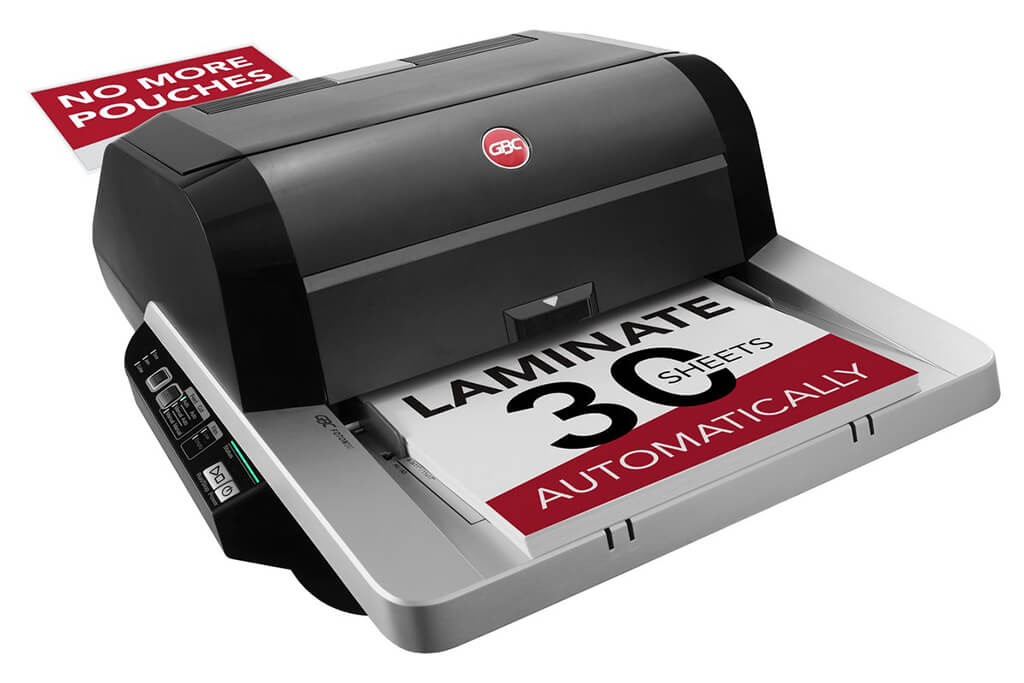
Image Source: ACCO Brands Corporation Official Site
(https://www.gbc-machines.com/products/gbc-foton-30-automatic-laminator)
(https://www.gbc-machines.com/products/gbc-foton-30-automatic-laminator)
Example facilities
Schools, hospitals, municipalities, etc.
Reasons for recommendation
Automates small-scale operations with fewer personnel
- With the push of a button, automatically laminates 30 sheets of A4 paper in 15 minutes. Its size allows it to be placed on a desk, making it easy to install.
- By fully automating the process from feeding to lamination, it enables the handling of jobs with low daily processing volumes in parallel with other operations.
The fact that it does not require dedicated operators or subsequent processes makes it suitable for small-scale sites.
| Maximum processing speed | 7.0 m/min |
|---|---|
| Maximum width | 297 mm (A3 compatible) |
| Warm-up | about 4 minutes |
| Processing type | roll type, double-sided (with borders) |
| Voltage (CE) | AC220 to 240V |
| Main unit dimensions | W 580 mm / D 440 mm / H 250 mm |
[About 1,000+ sheets per month]
Medium-lot production
Medium-lot production
Revo-Flex
(Lami Corporation)
(Lami Corporation)
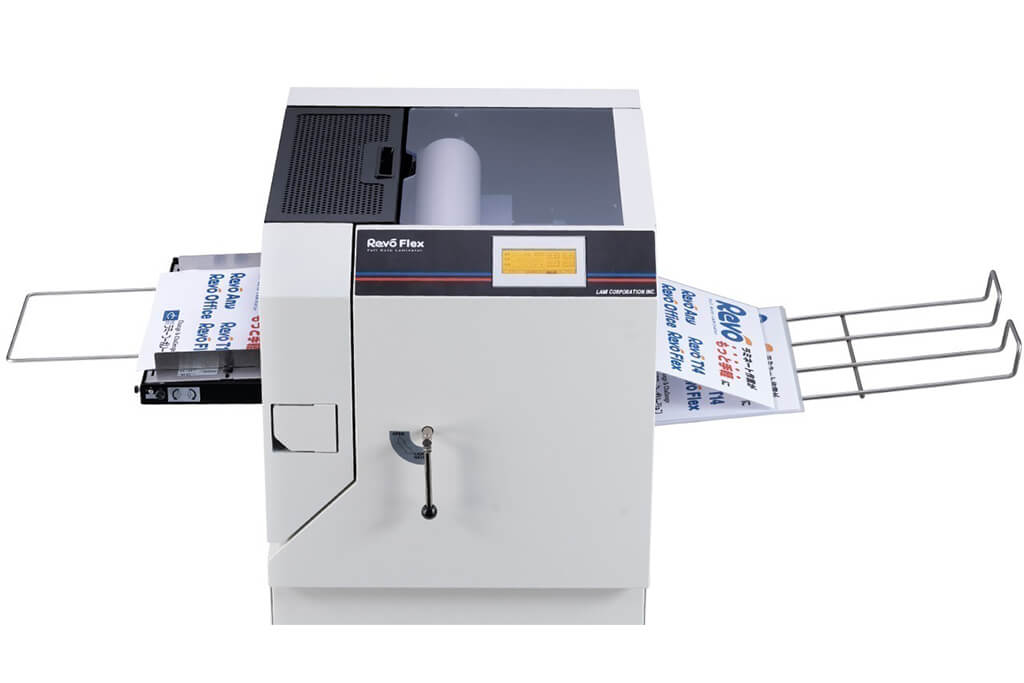
Image source: LAMI Corporation Official Website
(https://www.lami-corporation.co.jp/english/products/detail/51)
(https://www.lami-corporation.co.jp/english/products/detail/51)
Example facilities
Output centers, design offices, franchise headquarters, etc.
Reasons for recommendation
High-mix, fast-turnaround jobs are efficient through process reduction
- Completes trimming simultaneously with lamination, eliminating the need to move to subsequent processes or separate equipment.
Eliminates bottlenecks that tend to occur in on-demand printing and production sites. - High-precision automatic four-side trimming reduces trimming errors resulting from manual work, reducing film loss and the hassle of reprinting.
Even at sites with high-mix, small-lot production, it processes efficiently with consistent quality.
| Maximum processing speed | 2.0 m/min |
|---|---|
| Maximum width | 320 mm (SRA3 standard) |
| Warm-up | about 5 minutes *1 |
| Processing type | roll type, double-sided (border on/off selectable) |
| Voltage (CE) | AC230V |
| Main unit dimensions | W 1,300 mm / D 610 mm / H 1,080 mm *2 |
[10,000+ sheets per month]
High-lot production
High-lot production
Mini 76 TH
(Autobond Laminating)
(Autobond Laminating)
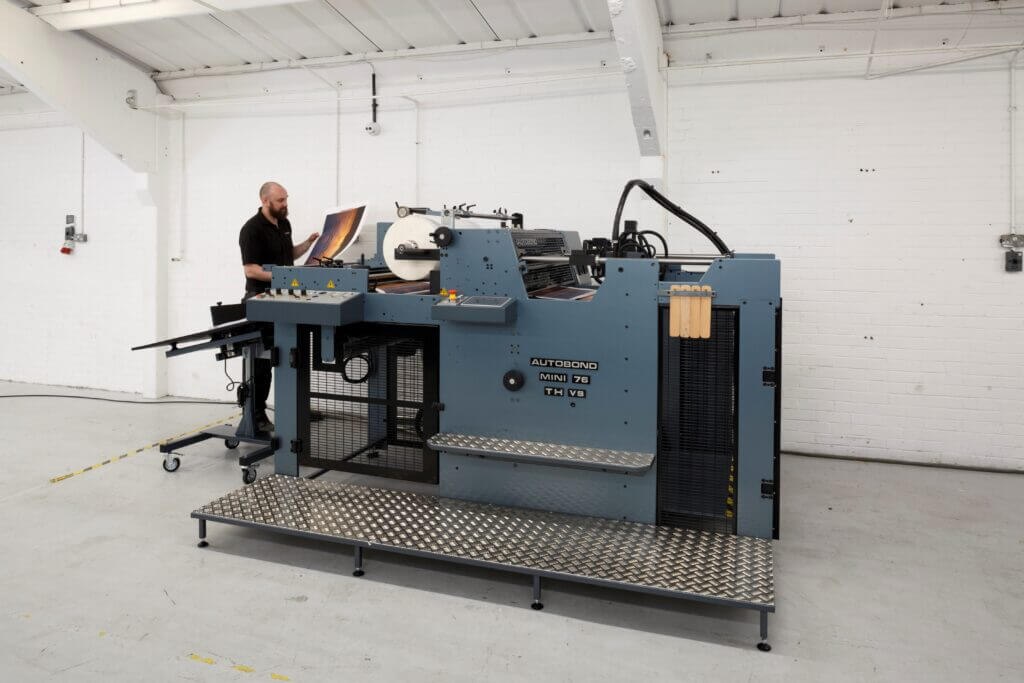
Image source: AUTOBOND Official Website
(https://www.autobondlaminating.com/machinery/thermal-lamination/mini/mini-76-th/)
(https://www.autobondlaminating.com/machinery/thermal-lamination/mini/mini-76-th/)
Example facilities
Printing factories, bookbinding lines, etc.
Reasons for recommendation
High-speed, continuous processing that can be integrated into mass-production lines
- Uses a steel side plate with a thickness of 20 mm described as sturdy like a tank. This rigid structure physically eliminates vibrations even at high-speed operations of 60 m per minute, maintaining stable processing accuracy.
- With a processing capacity of 60 m per minute, it can continuously handle large-format prints stably.
It demonstrates its true value when introduced as a part of a production line rather than as a standalone machine.
| Maximum processing speed | 60.0 m/min |
|---|---|
| Maximum width | 760 mm (B1+ compatible) |
| Warm-up | inquire for details |
| Processing type | roll type, single-sided or double-sided (borderless) |
| Voltage (CE) | inquire for details |
| Main unit dimensions | inquire for details |
*1. At 100°C (212°F) setting
*2. Dimensions when assembled, including the stand, tray, etc.