
A2 Laminator
This article explains A2 laminators from a business perspective, focusing on the efficient handling of larger printed materials while maintaining consistent, professional finishing quality.
Typical Applications and Where A2 Laminators Are Used
- Print shops and finishing companies
Posters, display panels, presentation boards, signage, menus, and promotional materials - On-demand print shops
Short-run posters, campaign displays, in-store POP materials, and large-format notices - Schools and educational institutions
Protecting classroom posters, event displays, visual learning materials, and noticeboard content - Government offices and public facilities
Protecting large-format notices, evacuation maps, safety signs, and public information displays - Retail stores and commercial facilities
Maintaining the durability and appearance of promotional posters, floor guides, price boards, and seasonal displays
Why A2 Is Often Chosen for Larger Displays
A2 is often selected because it offers excellent visibility while remaining relatively easy to handle.
It provides sufficient space for posters, diagrams, maps, and display materials that need to be viewed from a distance. Compared with A3, A2 delivers greater visual impact and accommodates larger text, images, and layouts. At the same time, it remains easier to manage than A1 or larger formats, particularly in environments where operators laminate materials frequently.
For businesses that regularly produce posters or display materials, an A2 laminator can help improve finishing quality while reducing the need to outsource larger-format lamination work.
A2 vs. SRA2: Size Comparison
SRA2 is a paper size designed for producing A2 finished outputs. It includes additional space for trimming after printing and lamination.
In professional printing environments, materials are often printed on SRA2 sheets rather than final-size A2 sheets. This provides room for bleed areas, minor print-position adjustments, and trimming after lamination. If your workflow involves trimming printed sheets down to A2 after finishing, SRA2 compatibility is an important factor to verify before selecting a laminator.
| Item | A2 | SRA2 |
|---|---|---|
| Size | 420 × 594 mm | 450 × 640 mm |
| Primary use | Finished size | Pre-processing size |
| Margins | None | Includes trimming margins |

Pre-Purchase Checks
- Maximum sheet size (A2 only or SRA2-compatible)
- Supported paper thickness
- Laminating speed and continuous throughput
- Warm-up time
- Film width, roll diameter, and core compatibility
- Ease of operation, including automatic settings and preset modes
- Installation requirements, including machine footprint, workspace, and power supply
For A2 workflows, supported sheet size and continuous processing performance directly affect productivity. Larger sheets require more time for feeding, alignment, lamination, and post-processing, so it is important to choose a model that matches your actual workload, not just the maximum paper size listed in the specifications.
Installation space is also more important than with smaller desktop laminators. Ensure there is sufficient room not only for the machine itself, but also for smooth sheet feeding and the safe handling of finished materials without bending or damage.
How to Evaluate Future Increases in Processing Volume
When selecting an A2 laminator, processing frequency should be considered alongside sheet size.
As the number of large-format sheets increases, manual feeding, alignment checks, film replacement, and repeated setup procedures can quickly become time-consuming. For business applications, automation features can make a significant difference by reducing operator workload and helping maintain consistent output quality.
On this site, we have carefully selected fully automatic laminator models according to production scale and application requirements. Please use this information as a reference when evaluating potential equipment investments.
How to Choose Film for a Roll-Type A2 Laminator
- Film thickness (lightweight: 25–50 μm / medium: 75–100 μm / heavyweight: 125–250 μm)
- Surface finish (gloss or matte)
- Roll width (approximately 450 mm for A2 / approximately 470–500 mm for SRA2)
- Roll length (short: 50–100 m / medium: 200–300 m / long: 500 m or more)
- Core diameter (approximately 25.4 mm / 50.8 mm / 76 mm)
- Maximum roll outer diameter supported by the machine
Select the film thickness and finish based on the intended application. Posters and display materials often require a balance between appearance, rigidity, and ease of handling. Gloss film enhances colour vibrancy, while matte film helps reduce reflections under strong lighting.
Roll width, core diameter, and roll outer diameter must match the laminator's specifications, so verifying film compatibility is essential. This is particularly important for A2 and SRA2 workflows, as an incorrect roll width can lead to material waste, unstable feeding, or insufficient trimming margins.
Automated models can help reduce setup errors, even when handling wider rolls or heavier films. In addition to basic specifications, be sure to evaluate the machine's automation and feeding capabilities.
FAQs About A2 Laminators
Q. What is the main advantage of choosing an A2 laminator over an A3 model?
A. An A2 laminator can process larger posters, display materials, maps, signs, and presentation boards that exceed the capabilities of a standard A3 laminator.
If your workplace frequently produces materials larger than A3, an A2 model can help reduce outsourcing costs and improve turnaround times. It also provides greater flexibility for producing promotional and informational displays in-house.
Q. Do I need SRA2 compatibility?
A. SRA2 compatibility is important if your workflow includes printing with bleed margins and trimming sheets after lamination.
For simple A2 finished-size applications, A2 support alone may be sufficient. However, print shops and on-demand printing businesses should verify SRA2 compatibility because it enables more reliable finishing and helps maintain clean edges after trimming.
Q. How can I reduce running costs?
A. For occasional, low-volume work, outsourcing or using a smaller laminator may be sufficient. For workplaces that regularly process A2 materials, roll laminating can help reduce the cost per sheet, especially during continuous production runs.
Running costs are also influenced by film width, roll length, film thickness, setup waste, and operator time. Choosing a model that supports efficient setup and stable feeding can help reduce both material waste and labour costs.
Q. What type of workplace is a fully automatic A2 laminator best suited for?
A. It is best suited for workplaces that frequently process large-format materials and want to minimize manual handling.
Compared with manual-feed machines, a fully automatic laminator can reduce operator involvement in setup, feeding, and sheet transport. The benefits become even greater as sheet size and production volume increase. It is particularly well suited for workplaces that need to maintain consistent large-format output quality while reducing processing time.
[Advertisement]
[By production scale]
Three Fully Automatic Laminators
[By production scale]
Three Fully Automatic Laminators
When choosing a fully automatic laminator, it is important to base your decision on the volume you process in a day rather than the size of the main unit or equipment scale.
This is an introduction to fully automatic laminators that match the workload and operational style of different production scales.
Advertiser Disclosure:
We receive compensation from some of the companies listed below.This compensation may affect which companies are included and the order in which they appear.
[About 100+ sheets per month]
Small-lot production
Small-lot production
GBC Foton 30
(ACCO Brands Corporation)
(ACCO Brands Corporation)
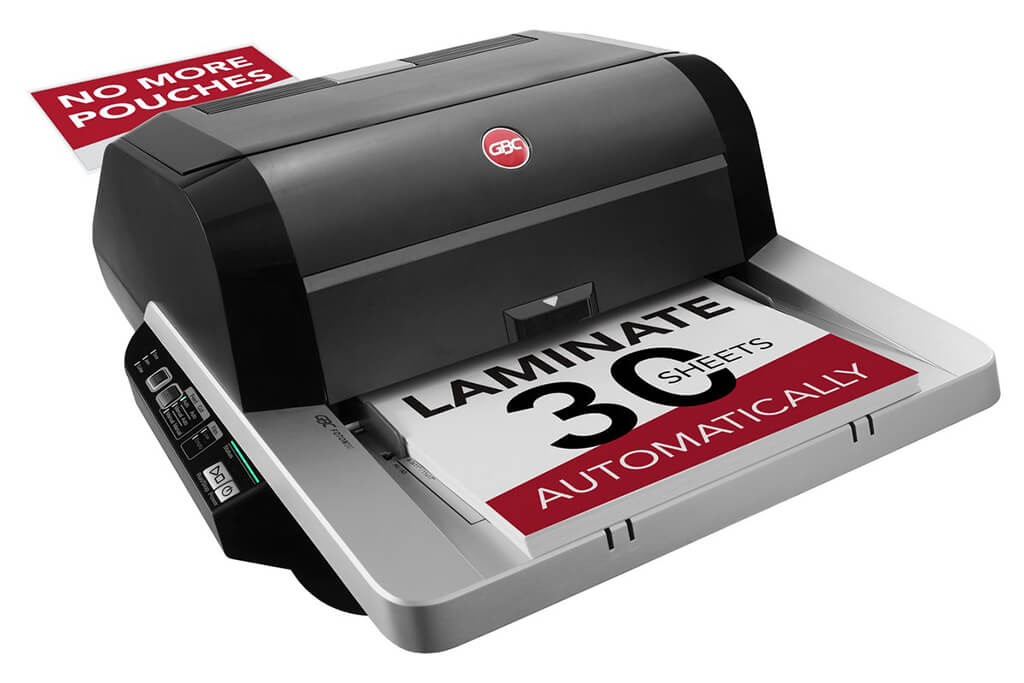
Image Source: ACCO Brands Corporation Official Site
(https://www.gbc-machines.com/products/gbc-foton-30-automatic-laminator)
(https://www.gbc-machines.com/products/gbc-foton-30-automatic-laminator)
Example facilities
Schools, hospitals, municipalities, etc.
Reasons for recommendation
Automates small-scale operations with fewer personnel
- With the push of a button, automatically laminates 30 sheets of A4 paper in 15 minutes. Its size allows it to be placed on a desk, making it easy to install.
- By fully automating the process from feeding to lamination, it enables the handling of jobs with low daily processing volumes in parallel with other operations.
The fact that it does not require dedicated operators or subsequent processes makes it suitable for small-scale sites.
| Maximum processing speed | 7.0 m/min |
|---|---|
| Maximum width | 297 mm (A3 compatible) |
| Warm-up | about 4 minutes |
| Processing type | roll type, double-sided (with borders) |
| Voltage (CE) | AC220 to 240V |
| Main unit dimensions | W 580 mm / D 440 mm / H 250 mm |
[About 1,000+ sheets per month]
Medium-lot production
Medium-lot production
Revo-Flex
(Lami Corporation)
(Lami Corporation)
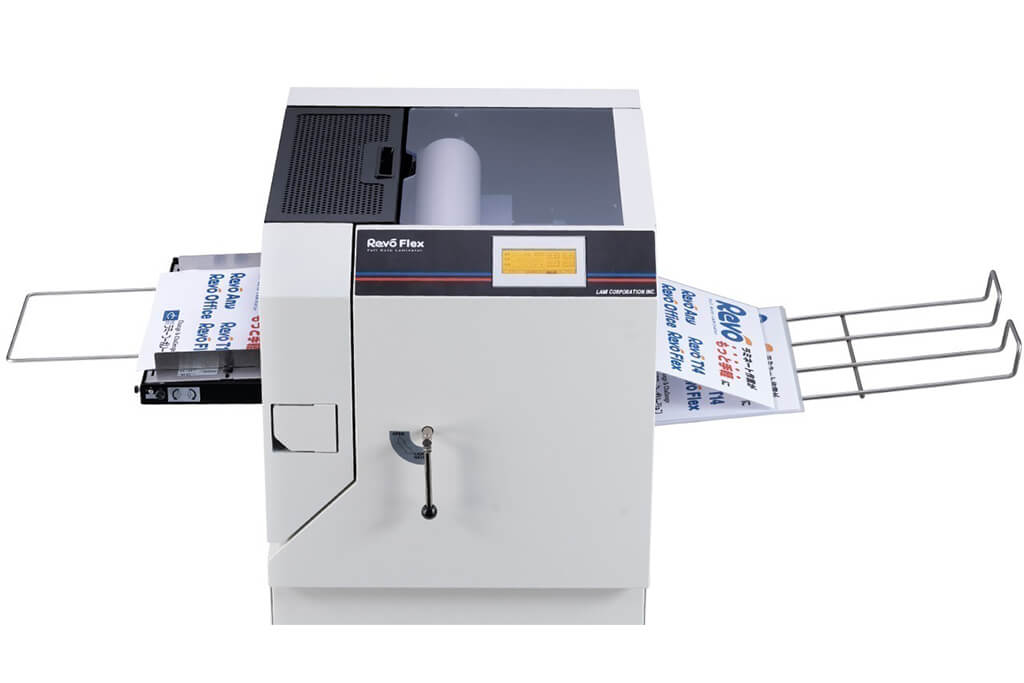
Image source: LAMI Corporation Official Website
(https://www.lami-corporation.co.jp/english/products/detail/51)
(https://www.lami-corporation.co.jp/english/products/detail/51)
Example facilities
Output centers, design offices, franchise headquarters, etc.
Reasons for recommendation
High-mix, fast-turnaround jobs are efficient through process reduction
- Completes trimming simultaneously with lamination, eliminating the need to move to subsequent processes or separate equipment.
Eliminates bottlenecks that tend to occur in on-demand printing and production sites. - High-precision automatic four-side trimming reduces trimming errors resulting from manual work, reducing film loss and the hassle of reprinting.
Even at sites with high-mix, small-lot production, it processes efficiently with consistent quality.
| Maximum processing speed | 2.0 m/min |
|---|---|
| Maximum width | 320 mm (SRA3 standard) |
| Warm-up | about 5 minutes *1 |
| Processing type | roll type, double-sided (border on/off selectable) |
| Voltage (CE) | AC230V |
| Main unit dimensions | W 1,300 mm / D 610 mm / H 1,080 mm *2 |
[10,000+ sheets per month]
High-lot production
High-lot production
Mini 76 TH
(Autobond Laminating)
(Autobond Laminating)
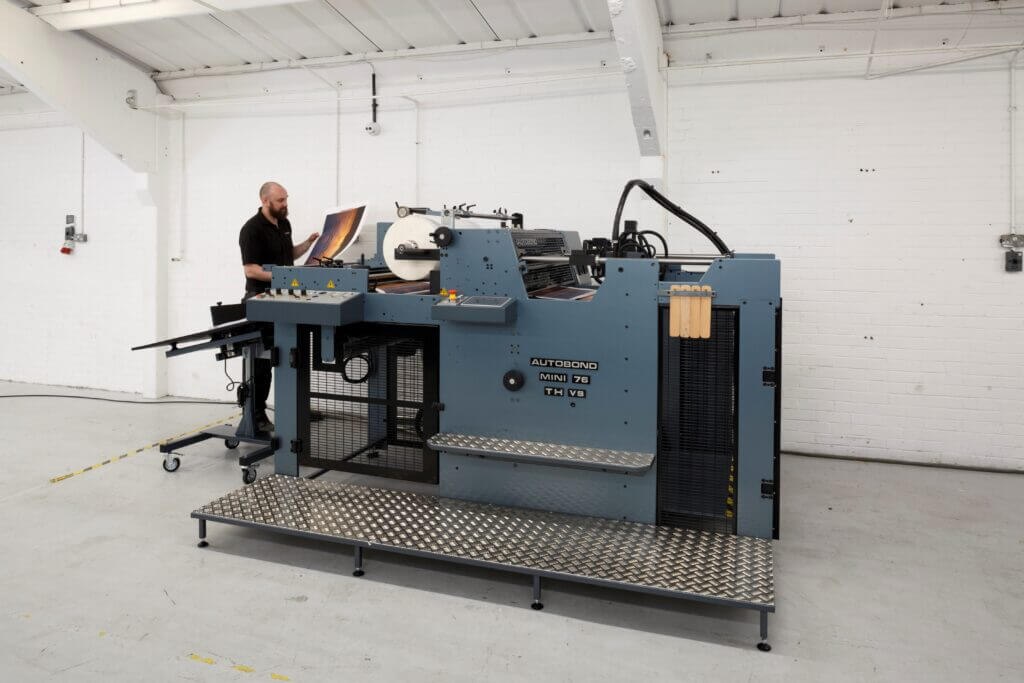
Image source: AUTOBOND Official Website
(https://www.autobondlaminating.com/machinery/thermal-lamination/mini/mini-76-th/)
(https://www.autobondlaminating.com/machinery/thermal-lamination/mini/mini-76-th/)
Example facilities
Printing factories, bookbinding lines, etc.
Reasons for recommendation
High-speed, continuous processing that can be integrated into mass-production lines
- Uses a steel side plate with a thickness of 20 mm described as sturdy like a tank. This rigid structure physically eliminates vibrations even at high-speed operations of 60 m per minute, maintaining stable processing accuracy.
- With a processing capacity of 60 m per minute, it can continuously handle large-format prints stably.
It demonstrates its true value when introduced as a part of a production line rather than as a standalone machine.
| Maximum processing speed | 60.0 m/min |
|---|---|
| Maximum width | 760 mm (B1+ compatible) |
| Warm-up | inquire for details |
| Processing type | roll type, single-sided or double-sided (borderless) |
| Voltage (CE) | inquire for details |
| Main unit dimensions | inquire for details |
*1. At 100°C (212°F) setting
*2. Dimensions when assembled, including the stand, tray, etc.